

PayBee vs Givebutter: All-in-One vs Purpose Built Galas — Which Fits Your Nonprofit? (2026)
Paybee and Givebutter are two of the highest rated fundraising platforms available to the nonprofit sector today and each excels at handling modern events charities rely on for funding their cause. They both offer solutions including silent auctions, mobile bidding, paddle raises, guest check-in and mobile tap-to-pay seamlessly on their platforms, so when it comes time to decide which will work best for your own needs, the focus comes down to their fundamentally different operational philosophies and what distinct organizational needs they serve.
Here is the bottom line verdict:
- Choose Givebutter if you want an all-in-one fundraising platform with a strong built in CRM, donation forms and peer-to-peer tools for your year round fundraising and backed by decent silent auction and ticketing capabilities.
- Choose PayBee if your nonprofit’s major driver is an annual gala, live auction or hybrid event that requires you to have a live auctioneer and livestreaming capabilities to reach a larger audience, simple pre-checins and checkouts that only require a phone or tablet and dedicated optional on site event night support to keep everything running smoothly.
To evaluate both solutions fairly, it is important to clear up a common misconception, Givebutter is considered ‘free’ to your organization if you allow them to ask your donors to cover the cost of their operations. So if a donor wants to donate $100, Givebutter defaults to asking the donor for a 15% tip to fund the platform, plus covering the payment processing fee ($3.20).
- Intended Gift: $100.00
- Processing Fee (2.9% + $0.30): $3.20
- Default Platform Tip (15%): $15.00
- Real Total Out-of-Pocket Cost: $118.20
(Note: The donor can manually edit the tip percentage down to 10%, 5%, or "No Tip", or opt out of the processing fee. Under the Givebutter Guarantee, if they opt out of the processing fee, Givebutter absorbs it so your charity still gets the full $100.00).
We will go more in depth on both platforms pricing models, but as always, the costs associated with both platforms is a concern so calling Givebutter "free" is technically accurate for the nonprofit's bank account, but it is donor funded, not cost-free.
This is precisely why platforms like PayBee use a flat 2% platform fee model instead as it allows the organization to pay a simple predictable fee directly without asking supporters for extra tips at checkout nor being required to enter into monthly contracts or fees.
It’s also important to touch on each company’s feedback with reviewers on sites like G2 and Capterra. While both companies garner positive reviews on these reviews sites, it is worth mentioning that Givebutter has a 4.7/5 rating across ~2,200 reviews on G2 and a 4.8/5 rating across ~870 reviews on Capterra both to its long history and excellent service. PayBee also is strong and holds a 4.8/5 rating on G2, and a 4.7 (18) on Capterra demonstration their clients also find their solutions exceptional.
A Quick Comparison Table of Key features
The following side-by-side comparison shows how both PayBee and Givebutter stack up against eachother when it comes to key feature dimensions, fee structures and operational strengths...
What is PayBee Exactly?
PayBee is a specialized fundraising and event management platform designed specifically for nonprofits that use live and virtual galas, auctions and other major fundraising events as their main funding opportunities and need a way to run their events through a simple intuitive software solution.
The company’s tool suit provides a unified way to streamline the complex operational workflow of live, virtual and hybrid gatherings and connects ticketing, check-in, live auctioneering, silent bidding and instant mobile checkout into a single unified event ecosystem that can all be run on a smartphone.
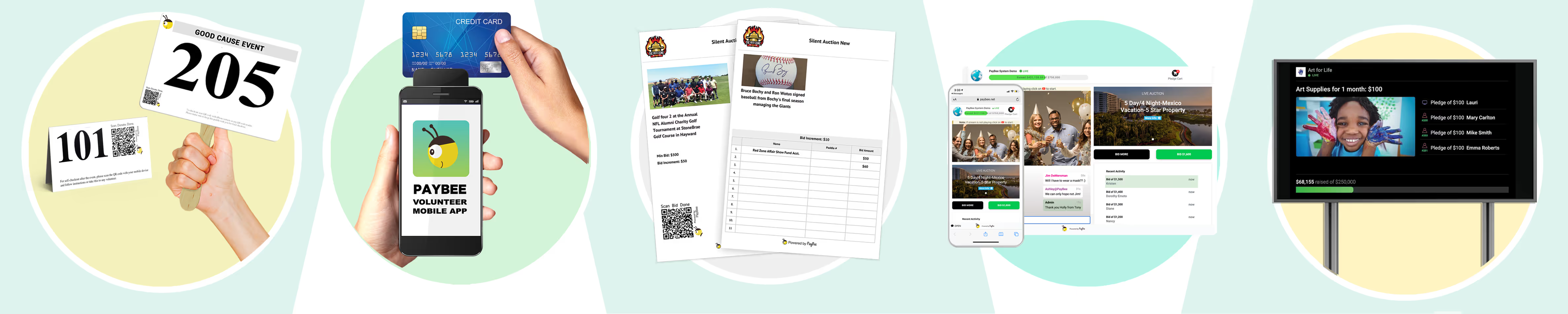
And rather than attempting to serve as a generic database for daily operations, PayBee focuses its engineering primarily on event execution. Key capabilities include:
What is PayBee, Really?
Think of PayBee as the "all-in-one event night assistant" for nonprofits. When a charity hosts a big annual gala, charity dinner, or auction, there are usually a ton of things that are going on all at once and it can be seriously difficult to keep up, let alone free your time to deepen donor relationships.
But Paybee takes care of all of this, selling tickets, checking people in at the door, taking bids on auction items, raising paddles for donations and collecting credit cards at the end of the night, all while instead of juggling five different apps or spreadsheet lists, they put everything into one simple system that your event staff, volunteers and guests can run right from their own phones.
PayBee doesn't try to be a giant year round contact list for everyday emails, rather the company’s focus is on making your big event night run smoothly so your charity raises as much money as possible without the stress of fractured systems, outdated apps or a massive volunteer crew.
What some of the key features actually mean in real life:
- Live Auctioneer Consoles (The Live Auction Screen):
- What it is: A simple and fast iPad or laptop screen built specifically for the auctioneer on stage and helpers or spotters in the crowd.
- How it works: As the auctioneer calls out bids for a trip or dinner package, a helper enters the bids on the screen in real time if a bider isn’t using a paddle or QR code to bid so your team can still keep track of who is winning and there’s no confusion over who won or what they’re owed.
- Native Virtual & Hybrid Production (Built-In Livestreaming):
- What it is: An easy way to stream the gala online for people watching from home or even abroad.
- How it works: Instead of sending home viewers to YouTube or Facebook (where video lags 20 to 30 seconds behind), PayBee streams the event live right next to a bidding box so your guests can place a bid or donate right from their phones and it shows up on the screen at the venue instantly for all to see.
- Flexible Event Checkout (Instant Mobile Payment):
- What it is: A way for guests to pay their bill on their own phone at the end of the night so no long lines or lost revenue.
- How it works: Nobody likes waiting in a 30 minute line to pay for their auction items at 10 PM when all they want to do is get home. With PayBee your guests get a text message on their phone, tap to see their total (tickets + auction wins + donations) and pay right there using Apple Pay, Google Pay or a credit card all automatically. They can also just tap their card on a volunteer's phone to pay and leave if they need assistance.
- Hands On Support (Real Humans on Event Night):
- What it is: Help from real people with specialized event experience before and during your event.
- How it works: You get a dedicated person to help set up your event beforehand. If you want extra peace of mind, PayBee can even send trained staff members to your event in person to set up the tech, train your volunteers and handle any glitches while the gala is happening. But note, there is an additional fee for this service.
Who is it for?
PayBee is made for any nonprofit where a big event like an annual dinner, golf tournament, charity auction or gala is the most important way for you to raise money from an event each year. The company keeps fees simple with a 2% flat rate so you won’t need to sign confusing or expensive multi-year software contracts.
What is Givebutter, Really?
Think of Givebutter as a toolkit for your charity's everyday fundraising. While PayBee focuses heavily on big galas and auctions, Givebutter is built deal with the smaller events your charity may be doing throughout the year like running walkathons and email campaigns or to keeping track of who gave money last month and how much.
Givebutter’s main draw has been that they don’t charge you a software fee upfront, that is if you decide to go with their tipping structure where your donors are essentially covering the cost rather than your nonprofit. We’ll write more on the specifics on their fee structure later in this article, for now, let’s dig into all the specific features.
Here is what those key features actually mean in real life:
- Built-In Donor CRM (The Digital Address Book):
- What it is: A central contact list that tracks every supporter who interacts with your charity and any additional information you have like amounts and preferences.
- How it works: Givebutter automatically creates a profile for every donor in a database that sits on their platform. This helps you because you don’t need Excell spreadsheets or an additional CRM, you can simply see how much your donors have given over time, group families together or pull up a list of "people who haven't donated in the last six months" to send them a reminder all from this one database.
- Year Round Fundraising Tools (Donation Pages & Peer-to-Peer):
- What it is: Tools for things like easy to make web pages for taking donations or running community fundraisers.
- How it works: If you want to put a "Donate Now" button on your website, set up a monthly giving program, or have volunteers create individual fundraising pages for a 5K race as a peer-to-peer event, you can do all that with Givebutter pretty easily and quickly.
- Multi-Channel Engagement (Email & Text Blast Tools):
- What it is: You can use Givebutter like an email provider similar to Mailchimp in that you can send out emails and do email marketing without needing an extra email marketing tool.
- How it works: You can write and send email newsletters, automated thank-you notes or send out updates as text messages right from your Givebutter dashboard.
- Events & Bidding Modules (Basic Ticketing & Silent Auctions):
- What it is: Tools to sell tickets, check people in and run smaller online silent auctions.
- How it works: You can sell tickets for a luncheon, scan QR code passes at the door with an iPhone, accept tap-to-pay credit card payments and host online silent auctions and you donors don’t need anything more than their own personal phones.
Who is it best for?
Givebutter is ideal for small to midsize nonprofits that don’t have a budget for more robust and specific tools needed to run larger events. Due to its pricing structure and its toolset, small organizations can do a lot with Givebutter and still compete with their larger counterparts.
The Pricing Question: How "Free" Really Works
There are a lot of pricing models and when you’re trying to compare actual costs of all the different solutions head to head, it can all get confusing fast, especially when it comes to Givebutter and their free reputation. A major search intent for nonprofits evaluating Givebutter is understanding whether the platform is genuinely free and how its model compares to PayBee’s flat-rate structure which we will now list out so you can make a true and fair comparison.
How Givebutter’s $0 Model Works
Givebutter operates on a donor-tipping model. Which basically means your pushing the cost to use their platform onto your donors rather than absorbing it yourself. By default, when you set up a campaign or auction, when it comes time to check out Givebutter will include a prompt for them to ‘tip’ and pay for their service, for this not to happen you must opt out and then you will need to cover their 3% platform fee.
- When Donor Tips Are Enabled ($0 to Org): It is true that if the ‘tip’ is enabled, there is no cost to you, even if your donor decides not to tip, in this scenario Givebutter initiates its "Givebutter Guarantee" and eats the cost. According to their website, they have found 92% of donors choose to cover the costs.
- When Donor Tips Are Disabled: If your organization doesn’t want Givebutter to annoy your donors with excess fees, you can opt out of their tip model. In this case, Givebutter shifts to a standard fee structure which includes a 3% platform fee plus standard payment processing (typically 2.9% + $0.30 for credit cards, or 1.9% + $0.30 for ACH), higher than Paybee’s flat 2%.
- Givebutter Plus (Optional Upgrade): While the primary basic fundraising suite and CRM are free when tips are allowed, Givebutter offers an optional paid tier called Givebutter Plus that is priced on a contact based scale similar to email marketing platforms and starts at ~$29/month for up to 250 contacts, $79/month for up to 1,000, and $129/month for up to 2,500. This unlocks advanced CRM automations, automated workflows and deeper integrations such as QuickBooks and others.
One other thing to mention is that Givebutter can end up getting !5% or more in a tip, well exceeding the cost of the transaction, so while it is smart business for them, that is also less revenue for you in the long run.
PayBee’s Flat & Predictable Fee Model
PayBee takes a different approach and relies on flat fee for use so that organizations only pay when they generate funds. And while this number can vary each month depending on the number of donors or donations received, the fee can always be covered in what you bring in rather than an expensive monthly contract like so many other platforms.
- Flat Platform Fee: PayBee charges a straight 2% platform fee on electronic payments including credit cards and digital wallets while payments made via cash or check incur $0 in platform fees.
- Optional Premium Subscription ($499 for 2 Years): PayBee offers an optional tier that is instead of adding more tools, adds more one on one support for you and your team. These services include premium customer success services, dedicated onboarding and priority support for event planning so you can have the best chance of a successful event.
- Donor Coverage Option: Like Givebutter, PayBee also has a ‘tip’ based option if you choose to use itto cover your fees. But unlike Givebutter, they simply add a 2% flat fee and explain what it is rather than trying to get 15% or more and make money off of your clients.
The Strategic Trade-Off: Donor Tips vs. Org-Paid Fees
The truth is since Paybee also offers a ‘tip’ based option for your donors, and at a flat 2% ask, there really isn’t all that much that is different other than the higher tiers when it comes to pricing. But there is a difference at how the costs are presented to your supporters:
- The Givebutter Trade-Off: You can end up eliminating their platform software costs entirely, but you must be comfortable with Givebutter presenting your donors with an added tip prompt during checkout that can far exceed the actual fees for their service. While the vast majority of donors do seem to accept this, user reviews across G2 and Capterra occasionally note isolated instances of donor confusion regarding the tip request and the amount they ask for.
- The PayBee Trade-Off: You simply pay a flat 2% fee on electronic transactions and your donors are never bothered with prompts asking them for more money. This gives your supporters a clean check out process they clearly understand. But don’t forget, Paybee also has the same option to ‘tip,’ they just ask for the 2% and nothing more.
Feature-by-Feature Comparison
While knowing the costs associated with each platforms is very important, knowing what your getting for their fees is just as important to understand, especially in real world scenarios. Below is an answer-first breakdown comparing PayBee and Givebutter across key platform features.
1. Web Donations, Peer-to-Peer & Walkathons
- Givebutter: Built for viral giving so that anyone can make custom "Donate" buttons, goal thermometers or multi-team fundraising pages for walkathons and 5Ks where participants invite can invite their friends and family to donate.
- PayBee: Handles simple website donation forms and event related peer-to-peer pages well, but it focuses mostly on connecting those gifts back to an upcoming event rather than making them the stand alone one.
- Verdict: Givebutter wins. If you run year round peer-to-peer campaigns or community walkathons then Givebutter gives you more social features and design options and does a bit better than Paybee.
2. Donor Tracking & Database (CRM)
- Givebutter: Comes with a "digital address book" that acts like a CRM built in. You can see your supporter's full history, group spouses into one household, tag major donors and even run wealth screening checks to see who might give a bigger gift or can afford to donate again.
- PayBee: Tracks event guests, ticket buyers and bidding history well, but it isn't meant to be your permanent donor database or a CRM. Instead, it sends your event data directly into big CRM systems like Salesforce, Bloomerang or Raiser's Edge in order to keep their platform light weight for users.
- Verdict: Givebutter wins for built-in CRM. If you don't already have a main database or primary CRM already, then using Givebutters built in system will work well for you, although it is limited and to truly unlock all of the tools you will need to upgrade your account.
3. Email & Text Message Marketing
- Givebutter: Works like a mini Mailchimp. You can write regular newsletters, set up automated thank-you emails or text updates to specific donor groups right from the platform.
- PayBee: Focuses purely on event communications like sending ticket receipts, bid alerts, QR check-in passes and postvgala tax receipts rather than an email marketing hub.
- Verdict: Givebutter for newsletters; PayBee for event day. Givebutter is better for year-round broad email marketing, while PayBee keeps all communications laser focused on guest logistics before, during and after your event.
4. Silent Auctions & Mobile Bidding
- Givebutter: Guests scan a QR code at their table or click a text link to browse items on their phones, set auto-bids and get text alerts when outbid without needing to install another app on their phone.
- PayBee: Works almost identically so guests can use their phone's browser to bid, get instant outbid notifications and watch items close in real time without needing an app as well.
- Verdict: Tie. Both make silent mobile bidding completely frictionless for guests.
5. Paddle Raises & Fund-a-Need Drives
- Givebutter: Lets you project a live ‘thermometer screen’ on stage that lights up with donor names and pledge totals as people give from their phones or call out gifts.
- PayBee: Projects the same live progress display, but this option connects directly to a backend console where volunteers can type in verbal or paddle number pledges in a split second.
- Verdict: Edge to PayBee for live events. Both look great on screen, but PayBee's rapid input tools make tracking fast paced floor pledges much smoother during a live gala.
6. Event Check-In, Tap-to-Pay & Checkout
- Givebutter: Lets staff scan ticket QR codes at the door, take credit card payments by tapping and manage basic registration workflows well enough.
- PayBee: Handles check-in and tap-to-pay, but also adds automated cart grouping so that at 10 PM when your event is winding up, PayBee automatically bundles your guest's tickets, silent auction wins and live auction bids into a single, clean text message invoice that they can pay right from their phones.
- Verdict: Edge to PayBee for galas. PayBee’s combined cart saves your guests from paying three separate bills at the end of the night so you aren’t stuck with long check out lines and trying to figure out who won what.
7. Gala & Live Auction Depth: The Decisive Event Factor
While both platforms handle silent auctions and mobile bidding well, when it comes to managing a major in-person or hybrid gala, there is a clear winner for those looking to fundraise with larger events.
Dedicated Live Auctioneer Consoles
When you have a successful auction happening in real time, profitability comes down to your auctioneer, spotters and volunteers all working together to keep the anticipation and energy levels high while also benefiting as much as possible from your attendees generosity in order to help fund your cause.
- PayBee features a dedicated Live Auctioneer Console. This interface is specifically designed for live auction management that allows your operator or auctioneer to open bidding, increment bid steps instantly, log spotter calls and close lots when the bidding dies down.
- Givebutter handles auctions primarily through silent/online bidding modules and paddle raise tracking. While it effectively records bids placed on mobile devices, it lacks a specialized auctioneer focused console that can be used to increase participation and larger bids.
Native Livestreaming vs. Embedded Feeds
Hybrid and completely virtual events have changed and widened what’s possible for nonprofits today. But in order to really bank off of this new trend, broadcast quality and bidding latency dictate everything when sharing your events online.
- PayBee understood early on the importance of this technology and specifically created their platform to take full advantage creating native virtual studio and livestreaming capabilities at its core. Remote guests watch a low-latency broadcast directly alongside synchronized real time bidding buttons and live pledge meters within the same interface as your live guests are watching on the monitors in the room.
- Givebutter supports virtual events using Facebook Live or YouTube video embeds which are prone to many technical problems. And while these tools are easy to configure, third-party embeds often introduce broadcast delays of10 to 30 seconds making synchronized live auction bidding almost impossible for virtual attendees looking to bid on an item in the last minutes.
Event Night Execution
Managing 300+ guests during peak check-in or post event item pickup requires dedicated workflows using the right technology. PayBee’s architecture is engineered around large gala night logistics and offers card pre-authorization at check-in, split payment options for couples, instant digital receipts and real-time run-of-show tracking so your guest can both arrive and leave worry free with no long lines holding them up.
8. CRM & Year-Round Fundraising (Givebutter’s Core Strength)
To maintain complete objectivity, any fair evaluation must highlight where Givebutter genuinely excels as well, and here. they do. When it comes to a year round platform they do well, but as a CRM they definitely outperform as Paybee do not work as a CRM in the way Givebutter does.
A Complete System of Record
Managing separate systems for CRM, email newsletters, donation forms and events leads can be a tidious task and often leads to mistakes and missing information. Givebutter does a solid job of consolidating all of these into one unified workspace:
- Centralized Constituent Profiles: Track lifetime giving, event attendance, campaign involvement and custom tags in one place.
- Household & Group Management: Group family members or organizational donors together so you can see their relationships clearly.
- Wealth Screening: Access built in donor intelligence tools to identify major gift prospects within your contact list to increase your funding with no additional new supporters.
- Automated Marketing Workflows: Utilize Givebutter Plus (paid subscription option) to trigger automated email sequences based on donor actions like first time donors, recurring gift renewals and so on.
PayBee’s Integrated Approach
PayBee deliberately avoids trying to replace full featured CRMs and instead focuses on being the best option for events and leaves the CRM solutions to industry leaders such as Salesforce or Virtuous. So if your organization already has a primary CRM and needs standard setting technology for your annual gala, PayBee will fit perfectly into your existing tech stack. However, if your nonprofit lacks a central CRM and wants an all-in-one platform to run year round campaigns without monthly software fees, Givebutter is the clear winner here.
Support & Event Night Experience
It doesn’t matter how amazing a platform is when you have a few hundred guests show up to an event and something in their software goes wonky. This is when real customer support matters most, when it can cost you a year’s worth of revenue.
Givebutter: 24/7 Digital Support & Self-Serve Efficiency
Givebutter’s customer support is widely lauded in user reviews for its speed and accessibility and overall is highly rated. And all of their users, regardless of which tier including their free one, have access to 24/7 live chat and email support and a searchable help center. And for most smaller organizations running general fundraising campaigns or straightforward silent auctions this is fine in terms of getting something sorted out on the fly.
They also offer priority phone support that’s available 7 days a week when you upgrade to their Plus tier which also can work to help with piece of mind. But they do not offer dedicated on site staff or bespoke event night production management as they are a software provider and not an event guidance solution.
PayBee: Dedicated Onboarding & On-Site Event Staff
Just like Givebutter, Paybee also provides access to 24/7 live chat and email support and a searchable help center to it’s users, even the free ones. But what really sets them apart when it comes to support is first, their $499 Premium Plan which covers two full years making it extremely affordable and gives you dedicated account management, specialized event setup guidance and personalized training for staff and volunteers.
And going a step further, they even offer optional on-site event support for an additional fee which can place experienced event technicians directly at your venue! These technicians handle technical check-in setups, train front-desk volunteers, manage the live auctioneer console, monitor bidding latency and troubleshoot checkout bottlenecks in real time so you and your team can focus on other things. For large organizations where software failure or check-in delays could jeopardize a major annual revenue event, this hands on safety net is often a decisive factor and one of the most valuable investments a charity can make.
Clear Scenarios: "Choose Givebutter If..." vs. "Choose PayBee If..."
Want a scenario based verdict to make a final informed choice, here is where you can see which platform works best for your specific nonprofit’s needs:
Choose Givebutter if:
- You want a genuinely free platform: You want to keep software expenses at $0 and aren’t worried about your donors being marketed to in order to cover your expenses.
- You need an all-in-one fundraising suite: You want donation forms, crowdfunding, peer-to-peer campaigns, email/SMS marketing and event ticketing managed in one place.
- You need a built-in donor CRM: You don’t already have your own CRM and want to track contacts and segment your lists to increase donations within the platform.
- Your events focus primarily on silent auctions or ticketing: Your events revolve around silent mobile bidding, ticket sales or general peer-to-peer fundraising campaigns rather than complex live auctions.
Choose PayBee if:
- Your main event is a live auction or major gala: Your annual gala is your largest fundraiser and you need a sophisticated tool suite that works to increase participation and giving on your big night.
- You run hybrid or virtual galas: You want studio quality livestreaming with synchronized real time bidding overlays for your virtual attendees with no latency all built right into the platform.
- You prefer a simple, predictable flat fee: You prefer a transparent 2% platform fee paid directly by your organization so that you can keep your donor checkout experience free of tip prompts (although we do offer this option as well!).
- You want on-site support on event night: You want someone to come in and deal with all the technical aspects of your event so you never need to worry about set ups and running livestreams.
Migration & Hybrid Approaches
Choosing between PayBee and Givebutter does not always require an ‘all-or-nothing’ decision and some nonprofits adopt a hybrid software strategy based on campaign type rather than platform.
Running a Dual-Platform Strategy
Since both platforms offer a free tier, it’s totally feasible to use them both when you need each one’s specialization for your events.
- Givebutter for Year-Round Operations: You can simply use Givebutter as your primary donor CRM and embed their $0-platform-fee donation forms on your website and execute your peer-to-peer campaigns throughout the year while keeping costs essentially to zero.
- PayBee for the Marquee Gala: When you’re ready to hold a serious gala, live auction or hybrid auction, you can use Paybee to do the heavy event lifting and on site guest management while simply paying the flat 2% fee for using the platform. Then at the end of the night just download the spreadsheets and enter them into your Givebutter CRM or another central database.
Migrating from Givebutter to PayBee (or Vice Versa)
Migrating from one platform to another, regardless of which way you’re moving is pretty straight forward. All that is necessary is to download all your information in CVS format from one platform and import it into the other. Both platforms offer this exact capability and Paybee even offers hands on support when migrating from one platform to another.
Frequently Asked Questions (FAQ)
Is Givebutter really free for nonprofits?
Actually it depends. If you choose their tipping model, then yes, your organization doesn’t pay a dime even if they refuse to tip. However, if you opt out of their tipping tier, their platform fee is 3% and is paid entirely by your nonprofit, plus standard payment processing fees.
Does Givebutter support live auctions and mobile bidding?
Givebutter supports silent auctions, browser-based mobile bidding (via QR codes or links), and real time paddle raises.
How much does PayBee cost?
PayBee charges a flat 2% platform fee on electronic transactions while cash and check transactions are free.
Can I use PayBee if my nonprofit already has a donor CRM?
Yes. PayBee is engineered as a specialized event management engine that integrates smoothly with established CRMs like Salesforce and Raiser's Edge and your event transactions and guest records can be directly imported into your database.
What is Givebutter Plus?
Givebutter Plus is an optional paid add on tier that provides advanced CRM features, automated communication workflows, custom task management and direct QuickBooks accounting integrations and its pricing is contact based and starts at ~$29/month for up to 250 contacts.
Conclusion & Call to Action
Both PayBee and Givebutter are outstanding at what they do. They both have excellent feedback from users and each has it’s own strengths. So rather than which one has more bells and whistles, an honest comparison is more about which pricing model and actual software capabilities for the actual needs of your own organization.
Givebutter has earned its position as G2's top-rated nonprofit software by offering a $0 platform fee model, a solid CRM and versatile year round campaign tools while PayBee’s purpose built live auction solutions, native livestreaming studio, transparent 2% flat fee and available on site support make it the definitive choice for event centric development teams.
If you’re still on the fence after reading through this article, then we suggest giving both platforms a test run. You can sigh up to Paybee’s demo here, and it takes literally a minute to set up your account.
Start Fundraising
 Bill Allen
Bill Allen is an expat that has been travelling the world for the past 25 years. He received his MA in writing in New York too long ago to remember, but has been writing on all sorts of subjects far varied publications ever since. When he isn't writing he enjoys meditating and working on his own website, UpscaleDrinks.com. Feel free to connect with him any time.