

PayBee vs OneCause (2026): Features, Pricing & The Best Fit for Your Fundraiser
TL;DR: PayBee or OneCause?
PayBee and OneCause (now Bonterra OneCause) are both fantastic platforms for nonprofit organizations looking for a browser-based solution to help them create and manage fundraising campaigns.
While PayBee is brilliant if you need simple pay-as-you-go pricing (with no annual contract), a simple setup, and plenty of fundraising options, OneCause might be the ideal choice if you need a more established platform with support for niche events, and AI auction tools.
PayBee vs OneCause: Side by Side
Finding the ideal fundraising tool can be tricky when there are so many impressive options out there with similar features, structures, and pricing options.
That’s the trouble with the PayBee vs OneCause conversation, really, both are excellent browser-based nonprofit fundraising solutions, and they can both run live or silent auctions with mobile bidding, peer-to-peer campaigns, Fund-a-Need strategies, or even galas.
OneCause, though, is more directed towards organizations running larger-scale charity events, with a lot of specialist machinery built-in over the years, like dedicated golf management, or auction AI. PayBee is more interested in streamlining the various jobs event teams have to get through with hybrid, virtual, or in-person event, from selling tickets to keeping in touch with supporters.
What Is PayBee and Who Is It Best For?
PayBee is a comprehensive fundraising platform that helps charitable organizations run and manage virtual, hybrid, and in-person fundraising events. The platform combines everything groups need to sell tickets online or offline, handle check-ins with things like QR check-in options, and simplify all kinds of event types.
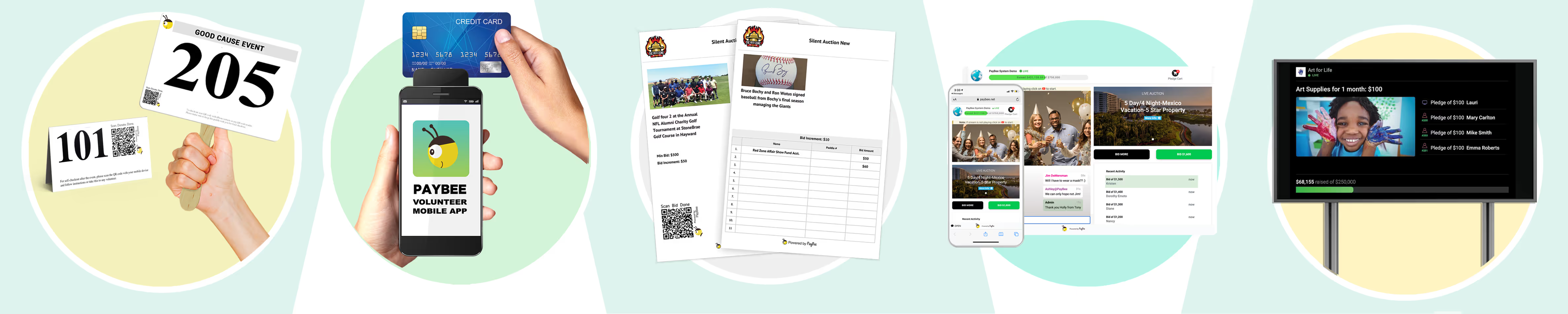
You can run smart live and silent auctions designed to give participants the same experience even if they’re not attending in person. There are various donation tools for managing peer-to-peer fundraising, recurring gifts, paddle raise or fund-a-need campaigns. You’ve also got some brilliant tools for digital events, like live streaming solutions, real-time activity monitors, a simplified mobile checkout, and custom donation pages.
Plus, PayBee gives organizations reporting tools, and built-in contact management features, so you can easily keep track of giving history and notes, and nurture relationships with community members over time.
It’s less for huge nonprofits with big budgets, and more for smaller and mid-sized groups who need an easier way to manage everything in one place without getting locked into an expensive long-term contract.
What Is OneCause, and Is It the Same as BidPal or Bonterra?
OneCause has been around a little longer than PayBee, and it’s gone through some very big changes in that time, it started as BidPal, a tool that was popular for mobile bidding tools. By 2018, the system had added enough extra tools for peer-to-peer campaigns, ticketing, and specialist event management that the old name felt a little limited, so it rebranded to OneCause.
In 2025, Bonterra, another very well-known digital fundraising solution provider, bought OneCause to bring the two feature sets together, now, the combined tool is sometimes referred to as “Bonterra OneCause” instead.
Compared to PayBee, OneCause concentrates more on nonprofits that rely a lot on specialist events for fundraising, like golf outings or annual galas, although it still has excellent tools for silent and live auctions, including AI-powered features like recommended bids.
More than 14,000 organizations use this technology now, and OneCause has even said that it’s helped raise more than $8 billion for nonprofit institutions, although the extra maturity in this platform does make it a more expensive, and somewhat more complex option for smaller groups.
PayBee vs OneCause: The Fundraising Features
PayBee and OneCause are closer than they look in functionality, once you get past the fact that one platform is a little bigger than the other. They’re both pretty versatile, with solutions that cover everything from virtual galas, to raffles, the biggest difference is really in how they compare in terms of simplicity, virtual and hybrid event focus, pricing structures, and niche features.
PayBee vs OneCause: Live & Silent Auctions
OneCause’s auctioning tools are arguably a little more advanced for bigger nonprofits. Although both platforms give you options for controlling max bidding, Buy Now options for online auctions, fund-a-need tools, raffles, bidder messaging, and mobile bidding, OneCause adds its own AI tools.
Those tools can automatically create descriptions for the items in your library (saving your volunteers some extra time), they can also recommend suggested bids to participants. There are also tools that can help with event preparation, and OneCause says those tools draw on insights taken from more than 40,000 auctions hosted worldwide.
PayBee doesn’t have similar AI features yet, but it still gives users an excellent bidding experience, and there are even real-time dashboards that track bids and leaderboards automatically.
Plus, both companies offer plenty of help with live auctions, as well as tap-to-pay options if you want to give your guests an easy way to settle up at the end of the evening. Neither Paybee or OneCause asks users to download an app for mobile bidding, with both, participants can just open an auction hub from a link or QR code, browse through items, bid, then checkout.
PayBee vs OneCause: Ticketing, Check-in and Payments
The two toolkits are pretty close on this front, and most of the features are pretty similar. PayBee handles ticket sales, RSVPs, guest information, table assignment, check-in (including QR check-in), and payments in the same place, and all the information gets added to a useful event record. Team members can even track meal choices for galas.
Plus, ticket buyers can add an extra donation during checkout, and volunteers can take walk-up payments at live events without having to pay for a card reader.
OneCause offers similar guest management and check-in tools, though it’s a little more advanced in certain areas, with complicated tier-based pricing options, multiple guest registrations, plus sponsorship management. However, setting those things up does take a little longer, according to OneCause reviews.
Also, while both tools promise secure payment options, OneCause does offer slightly more support for digital wallets.
PayBee vs OneCause: Donations and Text-to-Give
Both companies can help teams run mobile campaigns, with text-to-give features and mobile payments. OneCause tends to have a slightly better reputation for SMS fundraising, though, with it’s own specialist Text2Give tool, backed by OneCause Payments.
There’s also a lot of freedom around the donation options with both platforms too, so you’re not limited to just running auctions. Supporters can offer one-time gifts, make pledges, set up recurring donations, or even add-on donations when they’re buying tickets.
What makes PayBee a little more attractive than OneCause here is that the transaction fees are more consistent. PayBee’s fees generally stay around the 2.7% plus thirty cents mark, with a 2% fee for electronic payments, but no extra fees on checks or cash payments. OneCause’s fees can vary depending on the payment methods you’re using.
PayBee vs OneCause: Virtual and Hybrid Fundraising?
Both are great at handling virtual and hybrid events, but PayBee puts a lot more effort into making running those campaigns simpler. A lot of reviews OneCause reviews tend to mention a learning curve for the initial setup, and there aren’t quite as many features focused on managing digital experiences as you’d get with PayBee.
PayBee has built-in livestreaming capabilities, social media integrations, and live dashboards that keep track of leaderboards and auction activity, helping to make the experience feel more cohesive whether your supporters are getting involved in-person or online. Those capabilities are also bundled into a single package, rather than being treated like add-ons.
OneCause is still excellent for hybrid campaigns, but it’s designed more for complicated events where teams will need a lot of backend control and probably some extra support along the way, whereas PayBee is a more direct self-service option for smaller teams.
PayBee vs OneCause: Peer-to-Peer Fundraising
Again, both platforms support peer-to-peer fundraising efforts, mostly with tools for mobile check-in and check-out, video hosting, central display monitors for goals, and campaign management. OneCause does have slightly more comprehensive P2P packages though, with participant and team pages, milestones, badges, fitness tracking, and employer matching options.
If you pay for a higher tier package, OneCause can also add in connections with tools like Mailchimp, Salesforce, or Luminate.
Notably, PayBee still gives you individual and team fundraising pages, with great dashboards for tracking progress towards goals, it’s more than enough if you’re looking for an easy way to get started with straightforward community programs.
How Do Reporting, Donor Data, and Integrations Compare?
OneCause has more integration options, with peer-to-peer plans that can connect to tools like Salesforce, and separate connectors available for custom campaigns. PayBee has a smaller selection of integration options, although it does already have contact record keeping features so you can track giving history, event activity, notes, or tags in one place. You can also add imports from spreadsheets, connect to Zapier, and use webhooks to push information elsewhere.
Both tools give you great reports to work with, including real-time analytics and historical insights, although OneCause does let teams go a bit deeper with filterable custom parameters, scheduled reports, and automated progress dashboards.
Notably, customization is a bit of a sore spot for OneCause, since a lot of G2 and Capterra reviewers say there are very few options for page designs, and rigid layouts they can’t do much with. Many of the modules are also restrictive for teams that need complex ticketing and seating arrangements.
PayBee vs OneCause Pricing: What Will You Actually Pay?
If you’re worried about pricing, PayBee is going to be the easier option by far, as you can join without paying any subscription fee whatsoever. There’s no long-term contract, and the fees are transparent. On the free plan, you 2% platform fee for electronic payments, and a standard card processing rate of around 2.7% plus 30 cents. If you want extra event setup help, PayBee does offer packages starting at around $599.
OneCause is a lot more complicated, with two initial options to choose from. The Pay-as-you-go option starts at $200 and adds a 5% fee to all the funds you raise, although there is a cap on how much you’ll pay. The alternative package option starts at around $2,995 per year according to reviews, but the exact price you pay can vary, you’ll often need to get a custom quote.
Some customers also mention extra fees for things like training and setup. Those fees aren’t exactly hidden, but you won’t get a full view of exactly how much you’re going to pay until you’ve finished going through the initial setup process.
Is PayBee or OneCause Easier to Use?
PayBee is definitely the easier option overall if you’re new to running fundraising events, there are fewer advanced capabilities to get your head around before you start planning anything, and all of the modules are designed to be self-serve, so you don’t need to wait for extra assistance.
According to PayBee reviews on Capterra, where it has a 4.7/5 score, it’s easy to set up ticketing, track guests, and manage funds, and the live and silent auctions tend to run smoothly. The winnings also automatically add to carts to make checkout simpler for participants.
OneCause is easy enough to use once people learn the basics. Some of it’s features are very straight forward, such as the bidding site and registration tools. The difficult parts tend to appear in the admin work for getting campaigns and setup, and the niche modules like the golf module. Navigating the administrative backend during events can be a lot more complicated with OneCause too, which is why most companies tend to get onboarding support before they start using the platform.
Which Platform Has Better Customer Support?
Both platforms are committed to providing excellent customer support, and both have great reviews mentioning their attention to detail and responsivity. PayBee gives live chat, email, and phone support, as well as plenty of online knowledge bases and self-guided documentation.
On-site support is available for some events depending on the package you purchase, too, although OneCause goes a lot further with “white-glove” assistance. Alongside phone and email support, OneCause has dedicated managers to support teams, a comprehensive training academy, and a team of live coordinators who can help run your event.
That extra support does equate to additional fees, of course, but the extra cost might be worth it for teams running larger events who simply can’t afford to rely on volunteer assistance alone.
Who Should Choose PayBee vs OneCause?
Both platforms are excellent, the choice really depends on what you’re prioritizing in a fundraising platform right now.
Choose PayBee if:
- You want to avoid spending too much on fixed software costs
- Volunteers can handle most of the admin work for your campaigns
- You’re running auctions alongside ticket sales, raffles, and other donation strategies
- You want an excellent solution for virtual and hybrid fundraising
- P2P supports your events rather than making up a large part of the program
- Niche events like charity golf days aren’t too common
- You don’t want to be locked into a long-term contract
Choose OneCause if:
- You’re happy to spend more for more specialist event tools
- You run a lot of large events every year
- AI seems genuinely useful for your auction strategy
- Peer-to-peer fundraising is a big part of your program
- You run regular specialist events like golf tournaments
- You need white-label expert support on-site
- You don’t mind a higher learning curve
Where Does OneCause Have the Edge Over PayBee?
PayBee is a genuinely excellent fundraising platform for smaller groups running various events throughout the year to help them bring in extra cash. Still, OneCause is likely to be a lot more appealing to nonprofits that need a combination of scalability, unique event management features, AI tools, and custom support for every event you host.
The AI auction tools are brilliant if you need features that can generate descriptions, suggest items to bidders, and even check if you’re ready to host your next event. Also, the Golf focus can be very helpful too. There are specific features for foursomes, starting holes, scoring, leaderboards, sponsorships, and cart assignments you won’t get from most competitors.
OneCause also has more credibility than most other tools competing with PayBee if you’re looking for unique peer-to-peer programs, and you need plenty of market proof. After all, OneCause has been around since 2008, even if the name has changed a few times.
How Do You Switch From OneCause to PayBee?
If you do decide that PayBee is the simpler option for your fundraising strategy right now, but you’ve already been using OneCause for a while, switching doesn’t have to be too complicated. The PayBee team can help you with migrating contacts, giving histories, notes, recurring plans and databases into your new system, I’d recommend following a simple strategy:
- Export what you need: Collect your contact details, guest lists, auction items, sponsor records, and transaction histories from your OneCause account. Make sure the data is clean and de-duplicated before you start transferring.
- Sign up: Sign up for a PayBee account and choose the plan that works for you. Import contacts and settings during this stage, with PayBee support if necessary.
- Move over the auction catalog: Use spreadshseet imports to move your auction items, images, starting bids, increments, and item counts into PayBee, so you’re ready for your next auction event.
- Design a new event: Create tickets, and tables, and implement your Fund-a-Need features, payment settings, and any connections to tools like Salesforce or Zapier.
- Test everything: Walk through the experience like a donor, checking registration, bidding, outbid alerts, winning notifications, receipts, and payments.
It’s also helpful to spend a little time getting your team used to the new platform, so you might want to run them through a PayBee demo before you ask them to use the system long-term.
FAQs
Is PayBee or OneCause cheaper?
PayBee is cheaper, you can sign up for a $0 online fundraising plan, and pay a 2% fee on electronic payments, plus payment processing fees, or you can choose a Premium Events plan starting at $599 per month. OneCause gives you pay as you go pricing starting at $200 per month, with a 5% platform fee, plus payment processing costs, or there’s a professional package starting at $2,995.
Is OneCause the Same as BidPal or Bonterra?
BidPal rebranded into OneCause in 2018 after the company started adding new features to its platform that went beyond mobile bidding. Bonterra acquired OneCause in 2025, and combined the features of its platform with the toolkit, so you’ll now see OneCause described as “Bonterra OneCause” on some sites and reviews.
Does OneCause Require an app?
No, both OneCause and PayBee offer web-based bidding features, so neither platform asks a supporter to download a specialist app. Bidders can join an auction through a link or QR code, browse through available items, and make payments from their phone. Both companies also have staff-side mobile tools for payments and event administration, too.
What are OneCause’s hidden fees?
Technically, the fees aren’t hidden, but you won’t get a full look at what you can expect to pay until you’ve finished going through the initial setup. The PAYG plan has a $200 starting price and a 5% pay-later fee, while the Professional plans start at $2,995 per month, but the overall cost can vary depending on the amount of training and support you need.
Is OneCause Worth it?
Definitely for nonprofit organizations that run a lot of larger events every year. It gives teams excellent gala and auction tools, specialist options for golf events, robust peer-to-peer campaigns, fantastic on-site help, as well as some fantastic Auction AI capabilities. PayBee may still be better for transparent pricing, less contract lock-in and ease of use.
What’s the best OneCause alternative for nonprofits?
There are a lot of great options, including Handbid if you run regular auctions, GiveSmart for all-in-one event management, or Givebutter for general fundraising. PayBee is generally the best option for teams looking for simpler pricing, no contracts, excellent virtual and hybrid fundraising tools, and an easier setup.
PayBee vs OneCause: Which Should Your Nonprofit Choose?
Both PayBee and OneCause are excellent in their own way. OneCause is a brilliant, well-regarded platform for large-scale fundraising strategies, particularly if you want a platform with along background, excellent AI auction tools, unique golf fundraising capabilities, and incredible on-site support for every event you run.
PayBee, on the other hand, is better if you’re looking for something simpler, and more tuned to helping teams get their fundraising strategies up and running quickly. The pricing is lower, and far more transparent, with no contracts to lock you into the system. The setup is much simpler, according to G2 and Capterra reviews, and the tools genuinely help smaller teams handle a lot of the complicated parts of running fundraising events, from live and silent auctions to raffles.
If you’re not sure which option will work best for you, the easiest way to get a better idea is with a demo. You can book a PayBee demo for free and run through the whole experience with your team before you make a final choice.
Start Fundraising
 Rebekah Carter
An experienced copywriter and content producer with years of background in the technology, social media, and business development fields. Over the course of their career, they have developed social media posts, content strategies, blog content, eBooks, podcast scripts, and more. Their skills are deeply entwined with the power of the written word and what it can do to transform the perception and potential of a brand.