


The Best Fundraising App for Nonprofits in 2026: 14 Platforms Ranked
TL;DR
PayBee is the best fundraising app for nonprofits if you’re looking for something that can help you manage everything from setup to ticketing, event hosting, and even follow-up. Of course, there might still be other worthwhile options out there if you’re just looking for a simple donation app (like Zeffy), something to help with peer-to-peer fundraising (like GoFundMe), or a tool that raises money through branded merchandise (like Bonfire).
Here I’ll talk you through all of the top fourteen options I’d recommend to nonprofits or charities trying to find an easier way to bring their fundraising ideas to life.
Why Nonprofits Today Need Fundraising Apps
Fundraising apps are the digital tools that help charitable organizations collect donations, and other forms of support from their community. They’re usually offered as part of a wider piece of fundraising software. The app handles the donations and tracking campaign activity, while the surrounding software might add things like event management, communications or reports.
Those pieces of software can also either include lightweight CRM features, or connect to fundraising CRMs through integrations, so you can keep track of every donor, supporter, partner, volunteer, or other contributor separately.
The big value of the best fundraising app for nonprofits, is that it helps to support mobile giving strategies. With an app, supporters don’t have to visit a charity in person or log onto there website to give, they just tap a button on their mobile. That’s helpful since phones and tablets supply about 52% of nonprofit website visits according to M+R benchmarks.
At the same time, the best fundraising apps give nonprofits more tools to help manage and engage their audience. They can come with mobile checkout and tap to pay options, tools that help users register before an event, or keep track of tickets, alerts for auctions and so on.
Most of these tools also include helpful features that let teams collect and analyze data, so you can gain deeper insights into how to improve your fundraising activities, encourage recurring donations, or simply plan for upcoming events.
The Benefits of Fundraising Apps
Fundraising apps, much like the best fundraising software for nonprofits, help charitable institutions solve the problems that would hold them back from engaging volunteers and supporters, scaling fundraising activities, and collecting income.
The best fundraising apps:
- Make donations easier: People can fill out a form and send money straight from their phone or a tablet with a single click. Most tools let you accept various payment options from credit cards to PayPal. Youi can even sometimes use QR codes that let people scan a code and send a donation when they’re visiting an event in person.
- Help with personalization: Since an online fundraising platform or app can collect data about your audience, and even link to your CRM, it can help you create more specific segments that assist with personalizing future campaigns and outreach.
- Enable versatility: Leading fundraising apps let you run and manage more than one kind of fundraiser. You might have a walkathon for a school, a raffle for a church, or an auction for a hospital, and your team can track everything in the same place.
- Simplify receipts and reports: You’ll be able to track tickets, registrations, and donations in one place. Some tools also give you real-time analytics, so you can make decisions in the moment that help you improve the output of your campaign.
- Widen reach: Fundraising apps make it easier to share links to your website, campaign, or other channels across the web. You can share links on social media, that help you reach broader audiences, who can still get involved even if they’re not “local” to your nonprofit.
Many fundraising apps help out with engagement too, offering tools for live streaming, watch events, or live updates.
What to Look for in The Best Fundraising Apps
Every organization has its own priorities when it starts looking for fundraising tools for nonprofits, but there are certain features that most teams will need to prioritize. Focus on things like:
- Excellent mobile functionality: Both your staff and donors should be able to access the system from their phone without stumbling into a problem. It’s always worth making sure pages load quickly, mobile payments work seamlessly, and forms aren’t too long.
- Secure payment management: Payment gateways like Stripe should be PCI-DSS compliant, offer good data encryption, and protect donor information with fraud prevention tools. Secure payment processing, plus a range of payment options is essential if you want to increase your chances of ongoing donations.
- Integrations: Ideally, your fundraising app should connect to both your email marketing platform and social media channels. It also helps to have strong connections to CRM solutions, ticketing tools, plus potentially accounting systems.
- Support for the right fundraising formats: Think about what kind of fundraising events you’re going to be running. You might need tools that support live and silent auctions, online raffles, virtual & hybrid galas, livestreams, or peer-to-peer campaigns.
- Customization: Your app should reflect the brand behind your nonprofit. You should be able to add your logo to your pages, along with videos, images, and plenty of content that describes your mission.
- Easy-to-understand pricing: Fundraising app fees can vary. Some companies charge for subscriptions or platform fees. Others give you a free platform, but ask you to pay for extra features. You’ll also need to account for other costs, like credit card transaction fees.
It’s worth checking security features outside of secure payment processing too. Check whether you can set specific staff roles, if multi-factor authentication is available, and where data gets stored.
Fundraising App Pricing: Free vs Other Plans
If you’re looking for a free fundraising app for nonprofits, it’s worth remembering that different groups use the term “free” in different ways. If there’s a free plan, that usually means you can use the platform without a monthly subscription. However, you may still need to pay platform and payment fees when donations start coming in.
There are also platforms with a “tip-supported” option. For instance, Givebutter won’t charge any platform fee when the tip option is enabled, and it backs uncovered processing costs too. However, if you turn tips off, the fee is 3%, plus processing.
A fee-free model, like the one offered by Zeffy means you don’t pay a platform fee, or payment processing, because donors give contributions instead.
Alternatively, PayBee pricing doesn’t charge anything for online fundraising, though electronic transactions carry a 2% fee, then there’s a separate “event” option which costs $599 for unlimited events across two years.
The 14 Best Fundraising Apps for Nonprofits in 2026
There are plenty of great fundraising and donation apps worth considering, the choice you make really comes down to a handful of things, from the type of nonprofit organization you’re running, to the features you absolutely can’t compromise on.
1. PayBee: Best Overall Fundraising App for Auctions and Events
Best for: Nonprofits running live or silent auctions, galas, ticketed dinners, pledge drives, and hybrid events.
Starting Price: Free plan with a 2% fee on electronic transactions.
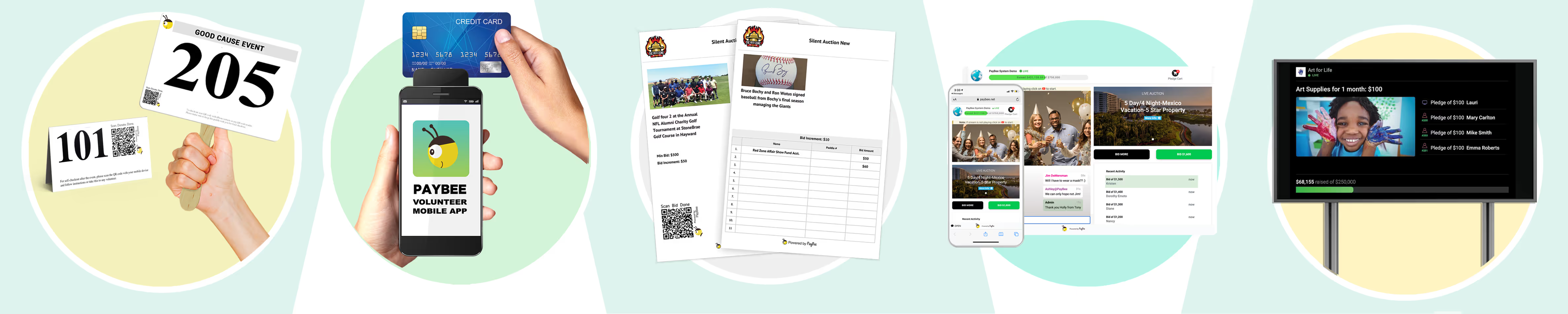
PayBee is the all-in-one event management and nonprofit fundraising platform designed to make life easier for charitable organizations. The system includes everything you need for ticketing, raffles, silent or live auctions, guest management, scheduling, plus reporting and analytics.
You also get a host of tools that make mobile giving simpler, from text-to-give options, to QR codes, social media connections, a secure mobile checkout, or live streaming. There are even tools that help with recurring giving, and ongoing volunteer and donor engagement.
The platform’s reputation is incredible, too. For instance, the Nakira foundation raised $222,261 using Paybee for its hybrid gala.
Pros:
- Coverage for auctions, raffles, galas, and more
- Ticketing, guest, and data management
- Support for hybrid, in-person and online events
- No-app mobile bidding and secure payments
- Easy-to-use for both volunteers and donors
Cons:
- 2% electronic transaction fee
- Doesn’t replace a full nonprofit CRM
2. GoFundMe Pro (Classy): Best for Peer-to-Peer
Best for: Established nonprofits running branded appeals, emergency campaigns, recurring giving, and peer-to-peer fundraising.
Starting price: Free plan available, though payment processing fees apply.
GoFundMe Pro, or Classy, is the more obvious choice among peer-to-peer fundraising platforms. For organizations running large digital events, the suite includes tools for crowdfunding, P2P, recurring donations, plus event ticketing, and it can integrate with CRM tools.
There are more brand customization options on the Pro suite than you’d get from standard GoFundMe, plus, the Intelligent Ask feature is great if you’re looking for a way to suggest relevant donation amounts to supporters.
It’s not the ideal tool for something like a live auction, but it’s still a good pick if most of your events are community led. The Grand Canyon Conservatory, for instance, used the GoFundMe Pro Campaign Studio to raise over $300,000 in one month.
Pros:
- All-in-one suite focusing on community-led fundraising
- Integrates with CRMs like Salesforce
- Lots of brand customization options
- Excellent access to GoFundMe’s existing audience
- Reliable customer support
Cons:
- Expensive add-on costs
- Slightly complicated for smaller teams
- Not the best reporting features
3. OneCause: Best for Large Galas
Best for: Nonprofits running expensive auctions, events, or galas.
Starting price: $500 per year.
OneCause directs its attention mostly towards larger galas and big events expected to bring in a lot of money through things like auctions or big one-off donations. There’s a full auction system that can handle ticketing, tables, mobile bidding, plus receipts. You can also offer text-to-give options, whether you’re running an event live, online, or in a hybrid format.
The mobile bidding experience has a fantastic reputation, and the all-in-one dashboards make it easier to keep ticketing, tables, and item tracking details in one place. You can also customize the online experience with your own graphics. Plus, the customer support is excellent, especially during live events.
Still, it’s a lot more expensive than some of the options on this list, so it might not be the best fundraising app for churches, or smaller teams with a limited budget. It also doesn’t always integrate as smoothly with external nonprofit tools.
Pros:
- Brilliant mobile bidding and auction tools
- Ticketing, tables, guest details, and receipts in one place
- Excellent customer support during live events
- Plenty of support for custom branding
- Useful reports
Cons:
- Expensive pricing with no free plan
- Bigger learning curve than some alternatives
- Limitations on integrations
4. Donorbox: Best for Donation Forms and Monthly Giving
Best for: Reliable donation forms and recurring giving.
Starting price: Free plan with a 2.95% platform fee.
Donorbox is less about fun and creative fundraising events, and more about making it easier for nonprofits to accept donations through a simple form. You can use the online fundraising platform to build a custom form, with embedded features like text-to-give capabilities. Then you simply add that form to your existing website.
This platform is also useful if you want to give supporters more flexibility with recurring giving, with options to set up weekly, monthly, quarterly, or annually donations through a range of payment methods. Plus, Donorbox also integrates with email marketing and CRM tools. It even offers a few features for things like peer-to-peer campaigns and crowdfunding.
Still, the fees can quickly add-up, particularly since important add-ons like advanced text-to-give are locked behind higher tiers. The donor tracking and reporting tools are a little limited, also.
Pros:
- Great for customizable, embeddable forms
- Flexible recurring donation options
- Free entry plan for beginners
- Useful for churches and smaller nonprofits
- Supports a range of payment methods
Cons:
- Platform fees can stack up with add-on costs
- Limited CRM functionality
- Very little support for auction-based events
5. Bloomerang Fundraising: Best for Text Giving and Retention Tracking
Best for: Donation forms, text giving, CRM functionality, and retention tracking.
Starting price: $40 per month billed annually.
Bloomerang Fundraising is interesting because it combines a nonprofit fundraising platform with a fully-featured CRM. It’s not really the best fundraising app for small nonprofits, since it can be quite complicated to set up, and the pricing is a little high.
Still it’s ideal if you want online forms, registrations, text-to-give, auction bidding, plus CRM insights in one place. The reporting tools also give you a fantastic focus on retention metrics, with grades that can be assigned to supporters based on their activity.
Bloomerang also has great integrations with email and accounting tools, plus peer-to-peer apps, and the customer support representatives always get great praise for being friendly and accessible.
Pros:
- Supports a good range of campaign types
- Access to Bloomerang CRM
- Dedicated retention tracking tools
- Excellent customer support
- Plenty of useful integrations
Cons:
- Complicated and sometimes expensive pricing
- Possible learning curve
- Not the best email outreach features
6. Fundraise Up: Best for Conversion Optimization
Best for: Larger nonprofits focused on higher conversion rates.
Starting price: Flat 4% fee on all successful transactions.
Fundraise Up, like Donorbox, competes to be the best fundraising app for nonprofits who gather most of their income through forms. The system helps you create a donation form that’s specially designed to increase giving amounts, with AI-optimized ask suggestions, plus an ultra-fast mobile checkout.
There’s also support for a huge range of payment options, including Apple Pay and PayPal, and a deliberate focus on recurring giving, with nudges that help to turn one-time givers into regular supporters. The Salvation Army even managed to achieve a massive 49% donor conversion rate with this platform, and 70% of donors accepted the personalized ask suggestion.
However, the platform costs can be quite high here, and there aren’t a lot of options for advanced customizations. Plus, you won’t have access to a full CRM, and sometimes integrating the platform with external tools can be difficult.
Pros:
- Conversion-rate optimized donation forms
- Excellent range of payment options
- Convenient for donors and volunteers
- Direct focus on recurring giving
- Reliable mobile performance
Cons:
- The various fees can add up quickly
- Not really suitable for auctions and ticketing
- Not a full nonprofit CRM
7. Funraise: Best for Growing Nonprofits That Want Fundraising and Records Together
Best for: Organizations that need simple fundraising tools and CRM functionality in one.
Starting price: Free to start with a 5% platform fee.
Funraise is one of the more modern fundraising apps for small nonprofits and growing institutions that need a little more than a basic form solution. It can help you manage a range of different fundraising ideas, whether you’re trying to earn recurring gifts, host events, or accept peer-to-peer donations.
There’s plenty of branding capability for donation landing pages and forms. Plus, the deep analytical tools and custom segmentation options align with he built in CRM to give you more insight into your support community. The free plan also gives you access to automation tools and pledge tracking, however, things like text-to-give and email campaigns are only available in premium plans.
Setting this system up takes a little time, so it might not be the best fundraising app for nonprofits that want to jump into an event quickly. Also, the platform high is higher than most.
Pros:
- Included CRM and donor management features
- Useful custom segmentation and analytics
- Support for tickets, peer-to-peer campaigns and forms
- Reliable customer support
- Brandable landing pages
Cons:
- High platform fee and extra costs for things like text-to-give
- Initial setup can take some time
- Rigid fields for forms
8. Givebutter: Best Free Option for Smaller Nonprofits
Best for: Smaller nonprofits looking for donation forms, auctions, basic CRM tools and more without a monthly bill.
Starting price: Free if you keep optional donor tips switched on.
Givebutter has earned its reputation as one of the best fundraising apps for small nonprofits. The basic plan gives you auction tools, mobile bidding, notifications, fulfillment tracking, donation forms, guest-check in, plus a built-in CRM.
You can accept donations from multiple payment methods, like Apple or Google Pay, or PayPal. Plus, there are extra features for engagement too, like simple email marketing features. Plenty of nonprofits have achieved great results with GiveButter, like the Summit Center that raised $296,000 through 189 teams with its autism walk.
The Donor Tip model is helpful for avoiding fees as a nonprofit, but it can upset supporters that weren’t aware of it. It’s also worth saying that although donors can use different payment methods, you are forced into he integrated Stripe setup.
Pros:
- Excellent feature set on the free plan
- Easy to use for staff and volunteers
- Crowdfunding, peer-to-peer, and text-to-give support
- Lightweight CRM included
- No fees when optional tips are switched on
Cons:
- The tip request can make checkouts confusing
- No advanced reporting or automation on the free plan
- Locked payment processing in Stripe
9. Zeffy: Best for Zero Fees
Best for: Eligible nonprofits that want to avoid as many fees as possible.
Starting price: No charge for nonprofits, and costs are covered through optional contributions.
Zeffy is the ultimate free fundraising app for nonprofits that want to avoid any kind of cost whatsoever. You keep everything a supporter gives you, and Zeff handles the platform fees and other costs through optional contributions.
Beyond it’s appealing price structure, Zeffy gives you a handy range of tools for event ticketing, peer-to-peer campaigns, or memberships, though it doesn’t really deal with auctions. It does support mobile donations, however, as well as raffles and online store sales.
One downside is that the Zeffy tap-to-pay option doesn’t work directly with recurring donation, membership forms, or auction tools. Also, there’s very little brand customization available for landing pages and forms.
Pros:
- Zero cost for eligible nonprofits
- Helpful for event ticketing, peer-to-peer, memberships and ecommerce
- Automation for receipts and data tracking
- Easy to setup and use for beginners
- Available in various countries worldwide
Cons:
- Not much branding or customization for forms
- Tips can confuse donors at checkout
- Tap-to-pay doesn’t work with everything
10. Neon One: Best for Nonprofits with Complicated Donor Records
Best for: Nonprofits that need fundraising forms, event records, and a full CRM.
Starting price: $99 per month (changes based on organization revenue).
Neon One might be the best fundraising app for nonprofits who need more help managing donor records and retention strategies. It combines an online fundraising platform with a full CRM that keeps support profiles, communications, event attendance, gifts, and recurring donations aligned.
Those internal tools can also help with monitoring individual, household, or organizational profiles. There’s also an event module that handles flexible ticketing, registrations, seating charts for in-person events, waitlists, plus automatic reminders. Plus, Neon One integrates well with website tools and specialist nonprofit plugins. It can also handle all kinds of payment options, and even enable automatic reconciliation.
The learning curve for this tool is a bit steeper though, particularly since there are so many complicated features and reports. Plus, there aren’t a lot of features intended for more creative event types.
Pros:
- Excellent records and analytics
- CRM included with unlimited contacts
- Useful ticketing, registration, and waitlist features
- Automatic reminders included
- Good range of integrations
Cons:
- Misses features for things like silent auctions
- Complicated to setup and manage
- No free plan
11. Give Lively: Best for Free Donation Pages and Text Giving
Best for: U.S. nonprofits that need donation pages, text-to-donate, peer-to-peer campaigns, and basic ticketing without fees.
Starting price: Free, but transaction fees apply.
If your virtual events strategy is all about text donations and free forms, Give Lively might be a good choice. It’s one of the more popular options for small groups, churches, and schools because it’s free to use with no hidden costs. Plus, it’s fast to set up, with great core tools like text-to-donate, custom campaign pages, or peer-to-peer fundraising.
One other thing that makes this nonprofit fundraising platform particularly useful is the Salesforce integration. There’s a free sync app that automatically transfers donations and event purchases into the right positions in your Salesforce account. Plus, you can request help from an integration specialist without paying extra.
Still, it’s not ideal for more complicated events. Give Lively can handle tickets, for instance, but it won’t help you manage an auction catalog, mobile bids, or paddle numbers. The direct integrations are also limited to Salesforce, Zapier, Double the Donation, or PayPal.
Pros:
- Free beginner platform
- Text giving and peer-to-peer options included
- Excellent Salesforce integration
- User-friendly for a quick and easy setup
- High-quality donation pages
Cons:
- Limited auction and ticketing software for nonprofits
- Fewer integrations than most
- Processing fees still apply
12. GiveSmart: Best for Running Lots of Ticketed Events
Best for: Established nonprofits and larger foundations running regular events.
Starting Price: Custom quote starting at around $3,000.
The high starting price for GiveSmart means it won’t be the best fundraising app for nonprofits with a limited budget, but if you’re running a lot of ticketed events every year, it can start to make sense. The full platform handles ticketing, seating, mobile bidding, silent auctions, plus donor data tracking. There’s also text-to-give functionality, and peer-to-peer campaign support.
One of the things that makes GiveSmart more appealing for the most profitable fundraisers is the level of support you get from the team. Chat and phone help are available 24/7 other than on listed holidays. You can also request extra assistance with setup and management.
Aside from the high cost, though, GiveSmart has some other downsides, like limited customization options for pages, emails, or text, and occasional technical glitches on the platform itself.
Pros:
- Excellent customer support and guidance
- Fantastic auction and mobile bidding options
- Donor data tracking included
- Included text-to-give and peer-to-peer campaigns
- Large focus on galas and big events
Cons:
- Expensive pricing for smaller groups with no free plans
- Occasional technical problems
- Limited customization options
13. RallyUp: Best for Raffles, A-Thons, and Schools
Best for: Schools, sports teams, booster clubs and community groups.
Starting price: Free with optional tips turned on.
If you’re looking for the best fundraising app for schools, sports teams, or smaller community groups, RallyUp is a good pick. You can use the app to manage raffles, sweepstakes, crowdfunding or ticketing events, with no monthly contracts whatsoever.
It’s also one of the better tools for branding, because you can completely customize your donation pages and create your own interactive experiences. There are even gamified tools like leaderboards that can help keep your donors engaged. If you upgrade to a paid plan, live and silent auctions, paddle raises, and room displays are also available.
The big downside is the backend complexity, since there’s so much to configure from the start. Also, though you can get started for free, prices can quickly start adding up if you need more advanced extras and mixed campaigns.
Pros:
- Good range of campaign types for community fundraisers
- Helpful customer service
- No monthly contracts required
- Excellent customization options for pages
- Gamified tools like leaderboards
Cons:
- Complicated to set up and managed
- Mixed campaigns can add extra fees
- Limited CRM depth
14. Handbid: Best for Organizations Focused on Auctions
Best for: Nonprofits with a heavy focus on bidding or auction events.
Starting price: Custom cost starting at $1,999 per year.
Handbid might be the best fundraising app for nonprofits who expect to get most of their income from auctions. It gives users a dedicated mobile platform where supporters can browse through items on their phone, buy tickets, take place in silent auctions, automate paddle raises, or text-to-give.
There’s a brilliant real-time dashboard to track things like bids, total revenue, check-ins, and other engagement data. Plus, staff can even automate the creation of digital invoices. The Tap-to-pay tool accepts most major credit cards, plus mobile payment options, and there are connections available for standard CRM and accounting tools.
The trouble, beside the fact that there’s no plan, is the interface can be quite tricky. Some guests say it’s hard to set up the initial app, and navigating item images can sometimes be clunky. The integrations are also limited if you have specialist tools.
Pros:
- Excellent auction and ticketing tools
- Bidder records, tickets, and payments in one place
- Supports a strong mobile bidding experience
- Useful real-time dashboards and insights
- Reliable customer support
Cons:
- No free tier, and the starting price is high
- Slightly confusing interface for some users
- Integration limitations
15. BetterWorld: Best for Free Auctions and Event Fundraising
Best for: Small nonprofits, schools, and volunteer-led groups that need auctions, ticketing, donation pages and P2P campaigns with no platform fee.
Pricing: No platform fee, but transaction fees do apply.
Betterworld is one of the most cost-effective fundraising apps for nonprofits who like running auctions and regular fundraising events. Like GiveButter and Zeffy, it relies on optional tips added at the checkout stage to handle software costs, so you can keep the full donation.
The platform itself is easy to use, and it includes plenty of useful features like ticketing with sponsor tables, early-bird rates, or QR entry. There are also auctioning and raffle tools built-in, donation thermometers for keeping givers engaged, plus solutions for peer-to-peer campaigns.
This tool does lock you in a little in terms of customization though. Design layouts and structures are fixed in place, so it’s harder to make your brand stand out. Plus, there aren’t a lot of tools for things like live event management.
Pros:
- No platform fee thanks to optional tips
- Easy to use for online auctions, crowdfunding, and events
- Great for silent/online auctions or ticketing
- Fun extra features like donation thermometers and QR check-ins
- Works well for schools and smaller communities
Cons:
- Very limited in customization features
- Not intended for advanced or in-person events
- Payment processing fees still apply
How to Choose and Set Up The Best Fundraising App for Nonprofits
I’d narrow the best fundraising apps down by the kind of issues you usually struggle with and the events you want to run. The best option for a school might be something that combines data tracking with easy raffle management or donation forms. The best software for a church might be something that supports recurring giving.
If you’re part of a larger nonprofit organization or hospital foundation, you might need full CRM integration, or support for virtual & hybrid galas.
Before you commit to anything:
- Decide on your fundraising goals: Ask whether you’re going to be running galas, in-person events, raffles, silent or virtual auctions, peer-to-peer campaigns, or donation pages. Make sure you can manage everything in one place.
- Calculate the price for a full year: Look at platform fees, transaction costs, setup and administration, plus all the extras like the hardware you might need, or the money you’re going to spend on staff training and marketing.
- Test the app: Most of the best fundraising apps will give you a demo to try things out. Use it to see how tap-to-pay works, ensure everything works smoothly on mobile devices, and examine issues, like what might happen with a refunded bid.
I’d also take some time to check for integration options, make sure the reporting tools work, and make sure that the data your tool’s going to be collecting is properly protected.
Once you’ve chosen your app, train your staff so they know how to use it properly. Let them participate group training events where they handle things like monitoring donations, or making sure that gifts from winning bids in an auction get sent to the right user.
Monitor campaign and app performance analytics too. Don’t just check things like the number of new or regular donors you’re attracting. Pay attention to whether any of your volunteers or donors have issues with the app, or start recommending potential fixes.
Challenges to Overcome with the Best Fundraising Apps
Even the best fundraising app for nonprofits can stumble in a few areas. The main things worth watching out for when you add new tech to your fundraising strategy are:
- High transaction fees: Just because the basic plan you sign up for is free, doesn’t mean there won’t be any costs. Most apps charge payment processing fees for all kinds of transactions, and a lot of them add a platform fee to cover the cost of software and support.
- Free plan limitations: Most free tiers will cover donation forms and standard campaigns, but they might leave out things like custom branding, reporting, integrations, or even certain levels of customer support, it’s best to know in advance.
- Problematic payment pages: A secure payment portal won’t automatically look trustworthy to a donor. You’ll need to check you’re explaining how payment information is protected, display accurate processor information, and make sure optional tip requests aren’t hidden.
- Setup and usage problems: The best fundraising apps can sometimes make setup easy, but make it harder to deal with things like running multi-format campaigns or integrating your tools with special CRMs and other tools. Check help is available for those things.
- Migration issues: Some tools make it hard to switch to a new fundraising app for nonprofits later on. You’ll need to make sure you can access your donor records, move payment information from one system to another, and avoid data issues.
One thing to keep in mind is that if your biggest challenge comes down to cost, there are certain technology grants that can help you. It’s worth checking what you’re eligible for.
Fundraising App Trends Worth Watching
As nonprofits continue to experiment with more new and interesting fundraising ideas, donation apps and fundraising platforms are starting to grow alongside them. Already, we’re seeing certain tools adding AI into their software, to help with personalized donation suggestions, or automatically follow up with supporters after they send cash or purchase a ticket.
Payment options are improving too, with a combination of text-to-give options for mobile-first contributors, tap-to-pay for hybrid and in-person events, recurring subscription options, plus a bigger collection of payment method options.
We’re also seeing a growing interest in more creative event types. Many tools now support virtual and hybrid galas alongside peer-to-peer fundraising, crowdfunding, online raffles, and live virtual streaming sessions. Some apps are also introducing new ways to keep supporters engaged, from leaderboards or badges for gamifications, to real-time progress bars and countdown timers.
Every trend won’t necessarily be relevant to every nonprofit organization, but if you’re seeing anything that seems exciting for your specific audience right now, it’s worth making sure the app you choose is from a provider that’s paying attention to the current tide.
Which Fundraising App Should You Choose?
Honestly, it’d be unfair to suggest that there’s one best fundraising app for nonprofits everywhere. All of the tools we’ve mentioned here are great in their own way, from Zeffy that offers a completely free experience for smaller teams, to Neon One for CRM management, or even OneCause for large galas.
Overall, though, if you’re looking for an online fundraising platform that gives you more freedom and versatility in one place, without the high costs, PayBee is the one to consider. It’s the ideal toolkit for companies that need to manage donation pages, online streams, live and silent auctions, galas, raffles, plus peer-to-peer campaigns in one place.
It’s also the easier tools for both volunteers and donors to use as mobile giving grows increasingly popular. If you want to see for yourself whether it’s the right platform for you, there’s a free demo available, so you can put the software to the test yourself.
FAQs
What is the best fundraising app for nonprofits?
It really depends on what you need. PayBee is the better overall choice if you’re running auctions, galas, ticketed events, or hybrid fundraisers and need an all-in-one solution. Zeffy might be the better option if you want something completely free, while Givebutter is a good cost-effective solution for auctions, events, peer-to-peer fundraising and donor records.
What is the best fundraising app for small nonprofits?
An option like Givebutter or Zeffy will usually make sense if you have a very limited budget, provided that you’re clear about the tip options when creating your checkout. PayBee might be better if you have larger galas or events to run, and need more support through the process.
What is the best fundraising app for schools?
For schools, RallyUp is a helpful choice because it gives you support for all kinds of raffles, participant pages, team competitions, and sweepstakes. If you’re running PTA auctions, galas, or ticketed dinners, then PayBee is a little stronger for mobile bidding, live auctions and instant checkout options.
How much do fundraising apps charge?
Different platforms use different charging structures. Zeffy doesn’t charge anything and even handles background fees itself with optional contributions. Fundraise Up takes a flat 4% fee on all transactions. PayBee is free to use for the main platform with a 2% transaction fee, and there’s also a plan for companies that run regular events.
Are apps secure for processing donations?
They can be, as long as you check the payment processing system. Look for secure payment gateways like Stripe, and make sure all data is encrypted. Check for PCI-compliant gateways, and multi-factor authentication to protect donor data. Also make sure you’re regularly scanning your apps for potential security flaws.
What kind of campaigns can fundraising apps support?
Anything from campaigns focused on simple donation pages, to digital raffles, live or silent auctions, virtual or hybrid galas, livestreaming events, peer-to-peer campaigns, crowdfunding efforts, plus event ticketing. Different apps focus on different kinds of fundraising ideas.
Can fundraising apps improve donor engagement?
They can in a lot of different ways. First they make it easier for people to get involved and give money from anywhere. They can also give nonprofits tools they can use to personalize notifications and follow-up messages. Some tools also include donor leaderboards, livestreaming features, or social media integrations, too.
Can a fundraising app replace a nonprofit CRM
Not completely. Some apps are fine for smaller nonprofits that only have a short donor list. If you need comprehensive records, custom analytics, flexible segmentation options, automation, and other features, you’ll need either a nonprofit fundraising app with a built-in CRM, or something that connects with the tool you already use.
How long does it take to setup or migrate to a fundraising app?
An initial setup can take a few hours or a day, depending on how many features you need to get ready, and how much you want to customize. There are certain companies that can help you out with the initial configuration. Migrating can sometimes take longer, particularly if you have a lot of data you need to move from a system that locks down data access.
Can apps track campaign performance?
Yes, many apps can give you historical reports as well as real-time analytics to help with making informed decisions about your fundraising efforts. You can usually view donor activities, check funding levels, and see how close you are to reaching your campaign goals in one place. Some tools also let you download and share reports.
Start Fundraising