
Best Ticketing Software for Nonprofits: Top 10 Picks Compared
Ticketing software for nonprofits helps organizations sell event tickets, manage attendees, collect donations, and track supporter data in one system. The best platforms integrate with donor CRMs, offer discounted nonprofit pricing, support online and mobile ticketing, and reduce administrative workload while increasing event revenue.
Key Takeaways: Best Nonprofit Ticketing Software
- Prioritize Integration over Features: The "right" tool must bridge the gap between a transaction and a relationship. Choose software that automatically syncs ticket buyers with your donor CRM to eliminate data silos and staff burnout.
- Beware the "Free" Platform Myth: No software is truly free. Evaluate whether costs are covered by monthly subscriptions or hidden service fees passed to your donors, as transparency directly impacts donor trust.
- Match Tool to Event Complexity: For simple community events, minimalist tools like Zeffy work well; however, for high-stakes galas or hybrid auctions, specialized platforms like Paybee are essential for managing "Follow-Up" payments and mobile bidding.
- Focus on the Supporter Journey: Look for features that increase Revenue Per Attendee, such as integrated donation add-ons, "Tap to Pay" checkouts, and automated tax receipting.
- Reduce "Cognitive Load" for Staff: The best ticketing software replaces manual spreadsheets with automated workflows, allowing your team to focus on high-touch cultivation rather than clerical survival.
When it comes to fundraising, for many nonprofits the entire process quickly becomes one of chronic organizational bracing, the stress felt by you and your team to sell in order to fund the mission at any cost. This can compound when you realize many traditional event management tools treat supporters as mere transactions, leaving teams exhausted by data silos and disconnected workflows that lead directly to staff and volunteer burnout.
The best way to combat all of this is to look at your fundraising though the lens of an integrated donor journey rather than one-off injections of cash. Every touch point should lead to another naturally, while also deepening the relationship between you and your supporters. Each transaction should also be relationship entry point rather than a sales endpoint. So how does this all tie in with ticketing software?
A comprehensive solution like Paybee can streamline the entire process by unifying ticketing, auctions and donor records into a single system, reducing app fatigue at the source. This helps create a feeling of safety for your team and lets your supporters feel truly seen and valued. With the right tools in place, your event stops feeling like a desperate sprint to revenue and starts functioning as a moment of connection that strengthens trust on both sides.
Why Nonprofits Need Specialized Ticketing Software
Relying on generic tools creates a state of sustained cognitive load as staff deal with the nightmares of manual spreadsheets, payment reconciliation and other important KPIs. Situations like this puts everyone in a defensive posture where they’re bracing for the next hurdle or data error rather than focusing on strategic donor engagement.
Fragmented data ecosystems like these that aren’t designed to understand the nuances of 501(c)(3) requirements can quickly erode your team’s confidence and hinder your overall mission. But auditing your current workflow to identify every instance where a human manually moves data from a payment processor to a spreadsheet using a "Single Entry Protocol" can easily shed light on where your biggest problems are.
For example, you should be able to tag a ticket purchase automatically so you can begin to understand your supporters on a truly deep level. Things like attendance, purchases and donations should all be able to be added to a donor profile automatically without the need for human intervention. Tools like Paybee do this well and take a major load of manual work off of your team and volunteers allowing them to feel secure that they are focusing on high-touch cultivation rather than clerical survival.
What Are the Must Have Features for Nonprofit Ticketing?
Choosing the right ticketing solution for your nonprofit is about more than just ticking off a bunch of boxes. Rather, it’s about directly aligning a solution to your organization’s needs. So before you begin trying to figure out what looks great on paper, we suggest you map out your fundraising strategies along with how you handle supporters, donors and even volunteers. The right platform should support the full supporter journey, from purchase to participation to follow ups while keeping all of your data accurate and easily accessible for your team.
Core Must Have Features
There are basic requirements for any nonprofit when it comes to which platform to grab. Today, having options like online and mobile ticket sales, multiple ticket types (general, VIP, free, and donation based), automated confirmation emails and QR code or digital check-ins are a must, and any solution that doesn’t provide these basics should be avoided at all cost.
Donation & Fundraising Tools
The top platforms integrate fundraising directly into the checkout experience with add-on donations, suggested giving amounts and options for recurring contributions. These ‘extras’ have been proven to increase donations and give donors a choice when it comes to how and how much they want to give without creating a separate donation flow.
CRM & Data Management
Look for built-in donor profiles, event attendance history, exportable reports, and CRM integration that will make adding your current solution much easier. This way you can have all your donor’s information readily available so follow ups are flawless and segmentation is accurate.
Payment Processing
The best tools accept credit cards, digital wallets and offline/manual payments with clear, transparent fees. Hidden additional costs or delayed payouts can create stress and undermine trust with your supporters, especially for organizations managing tight budgets.
Marketing & Engagement Tools
Features like promo codes, email integration, social sharing and dedicated event landing pages all help bring in more attendees while keeping your messaging consistent. Tools like these turn ticketing into an extension of your outreach strategy rather than a standalone transaction.
Essential Features Comparison (Paybee vs. Ticketing-Only Platforms)
Platforms like ours that are built specifically for nonprofits go beyond just selling tickets. By combining ticketing with fundraising, engagement and data ownership, we reduce the operational load on your teams and help events reliably convert attendees into long term supporters all with an easy to use user dashboard.
The Top 10 Solutions Compared
Choosing the "right tool for the task" has a lot more to do with the needs of your specific charity. Things like the type of event you plan, the number of people, whether you need the solution to do more than just ‘sell a ticket’ or if you are integrating other software with the platform. So we will try to cover all of these aspects for each tool below so you can make the most informed decision possible.
1. Paybee (Top Recommendation)
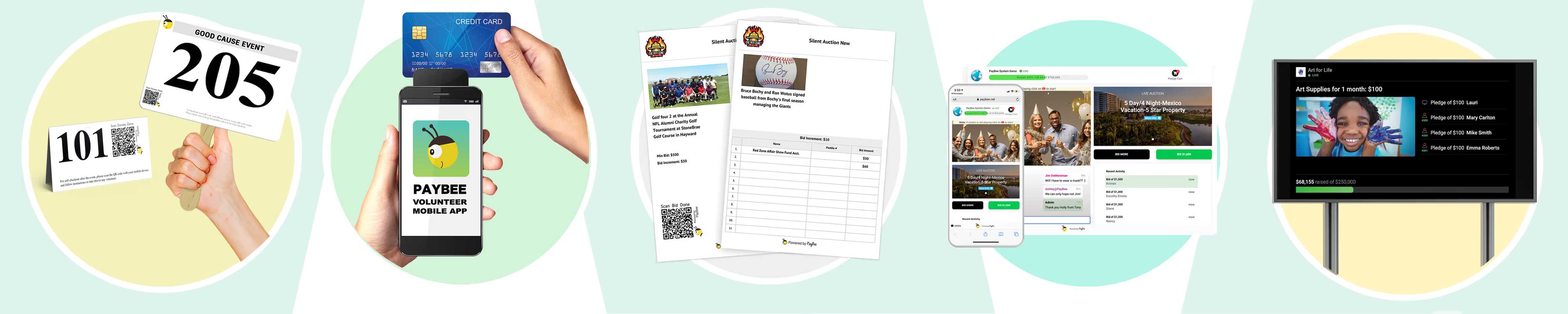
Overall we do find Paybee to be the best solution for anything larger than a small local gathering. We know we might be biased, but we’ve worked hard to create the most useful platform specifically for the nonprofit sector possible. It handles everything from simple ticket sales to complex hybrid events featuring live auctions, mobile bidding, and instant check outs. What sets us apart is our deep integration of donor data and "Follow Up" payment tools that ensure no pledge goes uncollected.
- Cost: Flat platform fees with various tiers and competitive processing rates.
- Customer Ease of Use: Extremely high. Donors love the "Self Checkout" and "Tap to Pay" features that eliminate long lines at the end of the night.
- URL: https://paybee.io/
2. Zeffy
Zeffy is a unique player in the market, specifically tailored for small organizations and community-driven events. It is the only 100% free platform, meaning they don't charge platform fees or even processing fees if the donor covers them. They rely on optional "tips" from donors to cover fees, so not really free. But it is an excellent "starter" tool for straightforward needs like bake sales or local workshops.
- Cost: 100% Free if donor covers fees, otherwise you do pay the fees.
- Customer Ease of Use: Very simple. The interface is clean and focused on a quick checkout for the donor.
- URL: https://www.zeffy.com/
3. TicketTailor
This company is perfect for those who need a simple solution and aren’t looking for add ons like integrated fundraising or auction tools. Although it is simplistic, it does the task of selling event tickets well. And since it is a simple tool, it helps keep costs low and the setup process fast. It integrates well with website builders but lacks the specialized donor management features found in more robust fundraising platforms.
- Cost: Per-ticket fee model; generous 50% discount for registered charities.
- Customer Ease of Use: High. It offers a professional, mobile-optimized buying experience for attendees.
- URL: https://www.tickettailor.com/
4. Whova
This company focuses on corporate style events with tons of attendees. It is a bit different than many nonprofit centric software solutions, so be aware. It does have ticketing capabilities, but its real strength lies in its mobile app, which allows for networking, agenda management and speaker interaction. It is less of a "fundraising" tool and more of a "logistics" tool for large scale professional summits.
- Cost: Custom quote-based pricing; generally more expensive due to the feature heavy app.
- Customer Ease of Use: High for tech-savvy attendees who want a digital hub for their event schedule.
- URL: https://whova.com/
5. Givebutter
This company is a modern, social focused fundraising platform that offers options for peer-to-peer campaigns and team based fundraising. Its ticketing includes fun features like "supporter feeds" where donors can leave messages and GIFs. While it covers many bases, it lacks some of the advanced backend reporting required by very large organizations.
- Cost: Free if you use the "tips" model, otherwise a small platform fee plus processing.
- Customer Ease of Use: Very good. It is considered one of the easier platforms for donors to interact with.
- URL: https://givebutter.com/
6. Eventbrite
Eventbrite is great for discoverability due to it’s own crowdsourcing marketplace. This is great for smaller nonprofits that need additional eyes on their misson, but the fees can be quite steep and they lack a lot of the backend solutions many charities and NGOs use to run their organizations. They also offer very little in the way of donor specific data or long-term engagement tools.
- Cost: Free for free events; tiered pricing for paid events (starts around 3.7% + $1.79 per ticket).
- Customer Ease of Use: Very high. Most customers already have an Eventbrite account, making the checkout nearly instant.
- URL: https://www.eventbrite.com/
7. Donorbox
Donorbox is primarily a donation software that added a robust ticketing module. It is a great choice for organizations that want to embed ticket forms directly into their own website. It’s highly functional and efficient, though it doesn't offer the "event atmosphere" features like live bidding or gamification that platforms like Paybee and others offer.
- Cost: 2.95% platform fee for ticketing, plus standard processing.
- Customer Ease of Use: Intuitive and minimalist. It focuses on getting the transaction done quickly without distractions.
- URL: https://donorbox.org/
8. OneCause
OneCause is a heavy-hitter in the gala and auction space. It is built for complex events with multiple revenue streams, such as golf tournaments and high end dinners. It is a powerful tool, though its depth can make the setup process more intensive for you and your staff compared to simpler tools.
- Cost: Custom annual subscription pricing (typically geared toward mid-to-large nonprofits).
- Customer Ease of Use: Solid. Provides a comprehensive mobile bidding experience that keeps guests engaged.
- URL: https://www.onecause.com/
9. Classy
Classy is a robust, enterprise-level platform used by many of the world's largest nonprofits. Their ticketing is highly customizable and looks beautiful, designed to match your brand perfectly. Because it is an enterprise solution, it may be "too much software" for a small organization, but it’s a gold standard for scaling.
- Cost: Custom pricing; usually involves an annual platform fee plus transaction fees.
- Customer Ease of Use: Superior. The user interface is polished, modern, and trustworthy.
- URL: https://www.classy.org/
10. Bloomerang
Bloomerang is first and foremost a CRM (Constituent Relationship Management) system that happens to have event registration features. It is the "right tool" if your primary goal is ensuring that every ticket purchaser is instantly logged into your donor database for long-term cultivation.
- Cost: Based on the number of records in your database; ticketing is often included in the suite.
- Customer Ease of Use: Standard. It is a clean, professional form-based registration experience.
- URL: https://bloomerang.co/
Quick Comparison: Ticketing Software for Nonprofits
Why Paybee Remains the Top Choice
While other tools offer niche benefits like Zeffy’s zero-cost model for small bake sales or Whova’s conference logistics, Paybee is uniquely designed to turn every ticket holder into a high value long time donor.
The platform bridges the gap between simple entry and complex fundraising with an easy to use backend. Unlike "entry only" tools, Paybee captures donor data at every touchpoint, from the initial ticket purchase to the final "outbid" notification during a live auction. For nonprofits that need their event to be a major revenue driver, Paybee's automated follow-ups and one-tap checkout provide the professional edge that ensures no contribution is left on the table.
See how Paybee automates the nonprofit event experience This video provides a practical look at how fee-free models and modern interfaces simplify the donor experience for nonprofit organizations.
Ticketing Software vs Event Management Software (What’s the Difference?)
Both ticketing software and event management software sell tickets, so in essence they look pretty similar. But in the user dashboard, they serve very different organizational needs.
So deciding which type of solution is best for your own organization really relies on operational complexity, your data needs and how closely your events connect to fundraising or long term supporter relationships.
Ticketing-Only Platforms
What they do:
Ticketing only platforms focus on a single job, selling tickets and processing payments. They typically offer basic event pages, simple seat or quantity selection and standard confirmation emails that can be sent out automatically when tickets are sold.
Pros
- Fast to set up and easy to use
- Lower fees and minimal learning curve
- Works well for one-off or low-stakes events
Cons
- Limited donor or attendee data
- No built-in fundraising, memberships, or follow-up tools
- Often requires manual exports to reconcile payments or track attendance
Best for:
When you’re hosting one off events or small community focused ones that don’t require a lot of donor data and drawn out engagement. They’re often less complex which makes them simple solutions for small organizations.
All-in-One Event Management Systems
What they do:
All-in-one platforms like ours combine registration, ticketing, donations, check-in, reporting, and supporter management into a single system. This way your events and supporters are never treated as a standalone transaction, but rather as a complete journey that includes everything you’d need to track and engage smartly with your supporters.
Key capabilities
- Event registration + ticketing
- Integrated fundraising and donation options
- On-site or mobile check-in
- Attendee, donor and volunteer tracking
- Centralized reporting and reconciliation
When the complexity justifies the cost:
One thing to mention here is that all in one systems will cost more since they are doing far more work than the typical ticketing software. You can even find free alternatives that are super basic, but can still work for very small events and fundraisers.
But if your events are tied to fundraising goals, memberships, recurring donors or volunteer engagement, or if you’re spending hours reconciling spreadsheets after each event, a complete solution like Paybee will make much better sense even though the costs will most likely be higher. But the platform will also end up saving you money in the long run, and a ton of time. So the fees often pay for themselves.
Our platform Paybee is designed specifically for nonprofits and allows for any organization, big or small to manage their ticket sales, donations and supporter data in one place rather than stitching together multiple tools.
Bottom line:
Ticketing specific software is about transactions and usually nothing else. Event management software is about relationships with your supporters as well as running your organizations back end. The more your event connects to mission, fundraising or long term impact, the more value there is in an all-in-one system.
Here’s a clear, nonprofit-savvy section you can publish as-is. It names the confusion honestly, explains the money flow, and helps readers avoid unpleasant surprises later.
How Much Does Ticketing Software for Nonprofits Cost?
Many ticketing platforms advertise themselves as “free,” but in reality a ticketing software is never free as they need to operate and update their services, so that means someone is always paying the bill. And in many cases, that cost is quietly passed on to donors and attendees through service fees, processing markups or reduced donation totals. Understanding how platforms price their services will help you decide where the true bargain is and what’s just marketing hype.
The “Free” Platform Myth
When a platform claims to be free, it usually means there’s no upfront subscription fee for the organization. That also means your donors are picking up the tab rather than you. Now that may seem great, but it can turn some donors off. Just imagine if you wanted to donate $50 to your favorite charity. At checkout, your total is $53.60, and you see there are additional service charges in order to make a donation! Some people may not care at all, but others can see it as not being transparent and you can end up loosing some trust, obvious not good at all. So weigh your options carefully.
Pricing Models Explained
Most nonprofit ticketing platforms use one (or a combination) of the following models:
Per-Ticket Fees
A fixed fee charged for every ticket sold (for example, $1–$3 per ticket).
- Predictable, but adds up quickly for high-volume events
- Often paid by the attendee, not the nonprofit
Monthly or Annual Subscriptions
A flat fee for access to the platform, regardless of ticket volume.
- Easier budgeting
- Often lower per-event cost over time
- Typically used by organizations running multiple events per year
Percentage of Revenue
The platform takes a cut of ticket sales or donations (commonly 2–6%).
- Scales with success
- Can quietly become expensive for larger fundraisers
“Free” Platforms with Processing Fees
No subscription cost, but higher credit card or transaction fees.
- The nonprofit avoids invoices
- Donors often pay more without realizing it
- Less control over fee transparency
Typical Cost Ranges
While exact pricing varies, most nonprofits fall into predictable tiers:
Small Nonprofits
(Community groups, grassroots orgs, single annual fundraiser)
- $0–$50/month or per-ticket fees
- 2.9%–4.9% payment processing
- Limited reporting and customization
Mid-Size Organizations
(Regular events, growing donor base)
- $50–$250/month
- Reduced per-ticket or revenue percentages
- Integrated donor data and reporting
Large Institutions
(Universities, hospitals, national nonprofits)
- $250–$1,000+/month
- Custom pricing or contracts
- Advanced features, lower processing rates, dedicated support
Hidden Costs to Watch For
Even platforms with reasonable sticker prices can carry hidden operational costs:
Payment Processing Markups
Some platforms add extra percentage points on top of the standard credit card fees already being charged. These types of extra costs can compound quickly.
Payout Delays
Some platforms hold your funds for days or weeks after your event and can mess up your cash flow. So check for holds on funds or other legal jargon used to describe pulling out finds.
Feature Paywalls
Basic plans may exclude essentials like:
- Custom reports
- Donor exports
- On-site check-in
- Tax receipt tools
What looks affordable upfront can become expensive once critical features that most nonprofits need are unlocked.
Bottom line:
There’s no such thing as truly free ticketing software. The real question isn’t whether you’ll pay, but who pays, how transparently, and at what long-term cost to your mission and your supporters.
Choosing the Right Path
Selecting the right ticketing software is more than a technical decision, it is a strategic one that’s based directly on your organization’s needs and how you see them evolving in the future. And while ‘free’ platforms may work great for small, localized efforts, larger organizations require a system that treats a ticket sale as the beginning of a relationship and not the end of a transaction.
If your goal is to move beyond "clerical survival" and start building a sustainable donor base, you’ll need a platform that offers additional tools like CRM integration, automated workflows and transparent pricing. By choosing a solution like Paybee, you aren't just selling a seat at an event, you are investing in a seamless experience that respects your staff's time and honors your donor’s generosity. The right tool does far more than simply making your event a successful fundraiser, it becomes a powerful catalyst for your long term mission.
Start Fundraising
 Bill Allen
Bill Allen is an expat that has been travelling the world for the past 25 years. He received his MA in writing in New York too long ago to remember, but has been writing on all sorts of subjects far varied publications ever since. When he isn't writing he enjoys meditating and working on his own website, UpscaleDrinks.com. Feel free to connect with him any time.