

The Ultimate Guide to Silent Auction Bid Sheets (Free Templates Included)
What is a silent auction bid sheet? A silent auction bid sheet is a printable tracking document placed beside an auction item to record guest bids discreetly. Every effective bid sheet contains 6 essential components: the item details, fair market value, starting bid, minimum bid increments, a buy-it-now price, and a bidder log table.
It doesn’t matter if you’re running a small school fundraiser or a large charity gala, using our bid sheet template or creating your own will help your charity prevent bid disputes, encourage higher bids and even speed up checkout at the end of your event.
Download Free Silent Auction Bid Sheet Templates
Use our ready-to-print and editable templates for your event and save a ton of time:
- [Download Free Printable PDF Template] (Best for quick printing and immediate pen-and-paper use)
- [Make a Copy in Google Docs] (Best for fully customizing branding, fonts, and layout online)
- [Download Editable Word File] (Best for offline layout edits)
How to Customize Your Bid Sheet Template
Now that you’ve downloaded your preferred template format from our library above, it’s time to edit your template to make it look as professional as possible and have it match your own charity’s branding.
Step 1. Add Your Logo and Match Event Colors
The first thing you’ll want to do is to add your own logo in the top right or left hand corner of the template. This can be done in either Google Docs or Microsoft Word. If you downloaded our PDF, you’ll need to use a special program that can alter PDF’s, or just copy and paste the information into either Google Docs or Microsoft Word.
Keep your logo proportional (no larger than 1.5 inches wide) so it doesn't push the actual bidding table onto a second page and get confusing. You should also match the table header’s accent colors to your primary campaign colors to create a cohesive look across all event signage.
Step 2. Format Page Margins for Clipboards
You should definitely be using a clipboard for your sheets so people can easily write on them and you can place the bid sheets onto a stand so people can see them right way when they reach your tables. By using the standard 9x12-inch clipboards, you’ll be able to maximize the space on the page and include at least 15 bidding rows while also preventing the top clip mechanism from hiding your critical header information like the Item Title or Fair Market Value.
Step 3. Pre-Fill Item Information digitally
If at all possible, use our template for each sheet with typed out information. Handwriting can be very difficult to decipher, especially under poor lighting conditions. If each sheet is typed out and printed individually, everything will look professional and cohesive and bring the bit of class to your tables. It also speeds up volunteer table setup on event day.

What to Include on a Silent Auction Bid Sheet
There are six core elements every bid sheet must have so people don’t get confused and simply skip bidding altogether. We’ve included each one so you know specifically, and a template so you can see how this looks ‘in real life.’
Sample Bid Sheet
Tip: You can copy and paste our sample template here and just paste it into your word processor and you have an instant template to work from!
The Essential Fields:
- Header & Item Details: Clearly state the Item Name (in bold), Item Number and a concise 2 to 3 sentence description outlining exactly what’s included including any expiration dates or restrictions. These should capture the attendees attention and make them want to bid, so don’t make them boring or generic!
- Fair Market Value (FMV): We have found that clearly showing the retail value of your items helps people to have an idea of what to bid and how high to go rather than having no idea and being afraid to over bid or even bid at all.
- Starting Bid & Increments: Again, this little physiological trick helps prevent people from asking themselves too many questions and cause bidder friction. When the exact starting dollar amount and the fixed raises are clearly laid out, people don’t need to do the math and just write their name and number with no guesswork.
- Donor Recognition: This is a great way to share the spotlight and give recognition to your donors by including a line such as "Generously donated by [Sponsor Name]" to thank them and keep your major and corporate sponsors returning year after year.
- Bid Log Table: Create 12 to 20 pre-filled rows with columns for Bidder Name (or Paddle Number), Phone/Email, and the Bid Amount. By pre-printing the required bid amounts on each line you take away friction and reduce math errors or unrealistic bids.
- Buy-It-Now Option: Always include a clear box at the top or bottom of your sheets with a buy it now price. This one option can lock in profits for your charity the moment the doors open. And a few of these tells other attendees your items are worth bidding on!

How to Calculate Starting Bids, Increments and Buy-It-Now Prices
This can be tricky if you’re not an auction veteran. But with our math, you’ll have solid starting bids that aren’t too high or low, and increments that give people a chance to win the items they want while still bringing in excellent revenue returns for your nonprofit.
We have seen our clients secure maximize revenue while keeping bidding fluid just by using these standard fundraising formulas to structure every item on your auction table.
The Essential Bidding Formulas
- Starting Bid Formula:
$$\text{Starting Bid} = \text{FMV} \times 0.30 \text{ to } 0.40$$
Rule of thumb: Set your opening bid between 30% and 40% of the Fair Market Value (FMV). For the standard retail items like restaurant gift cards or popular electronics you need to stick closer to 30% to get people bidding early on. But for more exclusive, hard-to-get experiences like VIP super bowl tickets you should be going as high as 40% or 50% to get the maximum return.
- Minimum Bid Increment Formula:
$$\text{Minimum Increment} = \text{FMV} \times 0.10 \text{ to } 0.15$$
Rule of thumb: Your minimum bid raises should be somewhere between 10% to 15% of the FMV. Also, use rounded numbers like $5, $10, $25, or $50 to keep the math aspect simple and easy for your attendees and volunteers.
- Buy-It-Now Price Formula:
$$\text{Buy-It-Now Price} = \text{FMV} \times 1.50 \text{ to } 2.00$$
Rule of thumb: This can be an awesome quick win, so price this at 150% to 200% of the FMV to secure some fast cash. You’ll be surprised how many bidders don’t want to play the bidding game and just want to own a specific prize.
Bidding Calculation Quick-Reference Table
Pro Tip: Do NOT use strange increments like $13 or $27, numbers like these just confuse everyone, require everyone to think about the numbers rather than the items and will often just end up with manual calculation errors during your post-event checkout.
Pricing Mistakes That Kill Your Auction’s Revenue
Even if you create the most beautiful auction template in the history of nonprofit fundraising, if you get the math wrong you’re potential will drop off as well. After watching our clients host thousands of events, here are the three biggest mistakes we’ve seen when setting up their sheets:
Setting $0 or Arbitrarily Low Starting Bids
Believe it or not, starting high value items off with a zero or super low bid often leads to lower final bids than just starting with our recommendations above. And while it can seem counter intuitive to think starting an item with a FMV of $500 at a dollar wouldn’t spark a bidding frenzy, in real life situations it more often gives people an instant ‘cheap’ valuation in their minds.
And again, often people will only bid one or two dollars more at a time, ending in lower overall profit than using our FMV formulas above! So always stick to our 30% to 40% starting bid rule to establish baseline market value.
Leaving Increment Lines Blank
Again, this can end up you getting one or two dollar incremental bids which draws out your auction and often leads to lower profit margins. Don’t forget, sheets are physical, so people need to check back to see if they’ve been outbid. After five checks, people will just get bored and stop bidding. Plus you’ll need a lot more sheets for each item. It’s best to just stick with preprinted increments that can actually guarantee every new bid adds meaningful revenue.
Omitting Bidder/Paddle Numbers
If you require your guests to write their full names each time or worse their intials, you’re going to have a serious legibility problem come check out time. It’s far easier to assign everyone a number or a paddle number and have them use one simple number for all their bids. This also works to preserve guest anonymity, helps fuel competitive bidding wars between friends and eliminates identity disputes when collecting payment.

Best Practices for Designing and Printing Paper Bid Sheets
Always use standard super high contrast formatting. Don’t forget, most likely your event will be dimply lit for ambiance, so your sheets need to be easily read even under low lighting conditions. Sticking to standard letter size (8.5" x 11") sheets with clean, highly readable 16pt to 20pt sans-serif fonts (like Arial or Roboto) in black ink on white paper allows even elderly guests to be able to read what’s there. Most of those fancy script fonts are about impossible to read under these types of lighting conditions.
Have your bidders use their assigned Paddle Number rather than their full name when writing on your sheets. This will save so much confusion later on and will speed up check out at the end of your night. Not only that but it also gives everyone anonymity so if they don’t have a lot of money to spend, they can still bid low and not feel embarrassed by their bids. Your attendees really will be happy with the increased privacy!
Limit the amount of bidding rows on your sheets to 12 or 15 rows. There are reasons for this. First, a sheet with 50 blank lines looks intimidating and empty while a sheet with 12 to 15 pre-printed rows looks achievable. Second, the limited spacing also signals that there is limited slots and they need to bid now to get one of them. Of course, you can always print out a second sheet if needed, but they don’t need to know that.
And lastly, never leave the "Bid Amount" column blank for guests to calculate a starting bid or their own bidding increments. First off people will feel friction to place the first bid since they don’t know what would be considered fair. Then you can end up with increments and math that gets super confusing and you’d need a calculator at the end of the night just to see who won. It’s far less complicated to allow bidders to simply write their name or paddle number next to the next available amount.
Paper Bid Sheets vs. Mobile Bidding: When to Upgrade?
Traditional paper bid sheets can be great for small local events, they’re cheap and they get the job done. The problem is, as your event grows, so does the friction people encounter using these paper alternatives. And we won’t even include the eco-friendly aspect of going digital here.
The Limits of Paper
- The Checkout Bottleneck: Volunteers must manually collect dozens of paper sheets, identify the highest valid bid, cross-reference messy handwriting and type charges into a payment gateway for each and every item. That’s okay when you are auctioning off 30 items, not so fun when you have 100 or more!
- Lost Outbid Revenue: This is actually a big one, see once a guest walks away from a paper display table to get a drink or sit for dinner, they have no idea they’ve been outbid unless they physically walk back to check the sheet again and again. And while they might do this a few times, after that it simply gets annoying, and those lost bids add up!
How Mobile Bidding Automates the Process
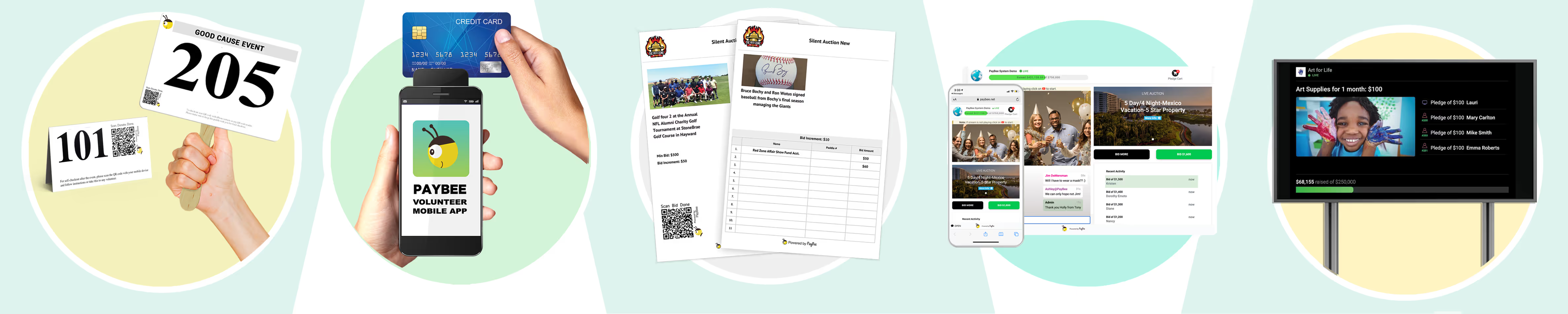
With modern mobile bidding platforms like PayBee, your guests can simply scan a QR code on their phone or bid directly through a custom event app that’s intuitive to use. Now your bidders can receive instant text alerts when they get outbid and give them the opportunity to raise their bid from anywhere in the room, or even from home giving your event reach that would never be possible with paper sheets alone.
There are a ton of amazing ways to use online platforms to seriously increase bidding, retention and reach so you can grow your events like never before. You can even have peole choose and verify their payment gateway the minute they join the auction, so all winners are not only listed, but checked out all on autopilot, saving you and your staff countless time and headaches.
Just take a moment to sign up for our completely free demo account and we can walk you through all of the available options and show you the ways they can increase your revenue right from day one. You can see some of our client success stories for ideas on how we can work together to grow your charity today.

QR Codes on Each Bid Sheet
The use of QR codes simplifies the bidding process for in-person attendees. Instead of having a single bid sheet next to each auction item, multiple bid sheets with item-specific QR codes can be created and placed anywhere at the live event.
Attendees can easily access the bid sheet for any item by scanning the QR code with their smartphone and entering a bid directly. This eliminates the crowding, pushing and shoving associated with a single, physical bid sheet and allows guests to bid more frequently and conveniently.
Silent auction bidders simply point, shoot and bid, scanning the QR code, and entering the auction with their mobile device.
<INCLUDE PROPRIETARY PHOTOS OF PLATFORM IN ACTION>
Auto-Bidding During Silent Auctions
Paybee's max auto-bidding feature is a popular option for guests participating in auctions. It's especially popular in today's mobile-first world, in which users are used to receiving countless notifications on their phones every day.
With this feature, guests don't have to worry about constantly monitoring their bids. Instead, they can focus on enjoying the event. Guests can even use the feature to set up automatic bids to ensure they don't miss out on winning an item. The automatic increase feature ensures that bidding continues until the "max bid" is reached — allowing bidders to stay within their budget while having a chance at winning the auction.
Live Updates on Silent Auction Bidding
The live text and email notifications sent to bidders keep them updated, alerting them to every step of the process, from placing a bid to being outbid and auction ending times. This feature ensures that guests are always aware of what's happening in the auction and can make informed decisions about their bids.
Paybee: Silent Auction Bid Sheets Made Easy
The Paybee system enhances silent auctions by offering a handful of digital and mobile payment processing options, including credit card readers and mobile web checkout. This allows the highest bidder to pay for their winnings in-app or in person. By requiring bidders to register in advance, your organization will be able to screen each user ahead of time to prevent fraud and verify their ability to pay. By connecting a funding source, mobile bidders can make payments immediately and collect their auction items at the event.
Tracking Virtual Bids and Reporting the Results
The system creates a live high-bid leaderboard, allowing guests to track the auction's progress and engage in friendly competition. It also provides in-depth reporting with robust backend reporting and automatic donor follow-ups — letting each and every donor know that they are appreciated.
On the back end, silent auction bidding sheets link to some pretty powerful features, such as automatic confirmation emails with customizable tax receipts and comprehensive post-event reporting capabilities to meet all of your foundation's reporting requirements.
Silent Auction Bid Sheets for Faster, More Efficient Bidding
Overall, these features take silent auction bidding sheets to a new level in the digital space by providing a fast, convenient, and efficient way to manage the silent auction and keep guests engaged.
How Do I Create My Own Custom Silent Auction Bidding Sheet on Paybee?
It’s easy! First, you'll upload your items into the platform and set auction-specific properties for each item, such as the minimum bid amount and custom bid increments. You'll then configure your auction settings with start and stop times for each item. Here, you can also change your required donor checkout settings, email preferences, promotions data and more.
Social sharing links and automatic email invitations will make sharing with your supporters a breeze!
<INCLUDE PROPRIETARY PHOTOS OF PLATFORM IN ACTION>
Why Paybee?
Our silent auction bidding campaigns the "Bee's knees" when it comes to supporting local and national causes. We make it easy to keep bidding, alerting your guests via text or email if they've been outbid — and are the first to congratulate them once they win. It's our goal to make sure they have a fantastic experience.
Paybee is the real deal when it comes to special events, such as silent auctions and fundraisers. We're a non-profit fundraising platform with a host of powerful tools that allow organizations to quickly and effectively raise funds for their communities.
Through our site, users can learn about silent auctions and the many ways their peers take control of fundraising. They can view resources, access sheet templates, create an auction schedule, and update their QR codes to reflect new auction items entered into the bidding. By entering the resources view, they’ll quickly learn which other tools are free and at their disposal, as well as the tools that will enhance their fundraising strategies as a whole.

Professional Event Hosting and Auctions
Paybee hosts a lot of online, hybrid and in-person silent auction and fundraising events. From concept to clean up, we're here to assist with pre-event ticketing and hosting mobile silent auctions to completion. Our easy-to-use platform launches your plan into action without the need for heavy reading or middle-of-the-night chats with online tech support (we are here, though, if you need us). Our Paybee Partners are also available to help you organize your silent auction or event — every step of the way.
A lot of things can happen at a silent auction event. Let us keep you on schedule. Want to know how to run a successful silent auction? If you want to know what makes a silent auction successful or what sells well at a silent auction, check out our blog for 100 fundraising ideas.
If you'd like a sneak peek of other silent bidding auctions, click here to "bee" inspired or check out these silent auction bid sheet templates to get started.
Frequently Asked Questions About Silent Auction Bid Sheets
What size should a silent auction bid sheet be?
Always use the standard letter paper size (8.5 x 11 inches) in portrait orientation as it offers enough space for legible text, item descriptions and up to 15 to 20 bidding lines.
Should we list bidder names or bidder numbers on paper sheets?
Our recommended best practice is to always use a number whenever possible. It greatly increases guest privacy and prevents bidders from backing off simply because they recognize a friend's name on the sheet, and it eliminates any illegible name writing problems.
How do you stop people from writing invalid bid amounts?
Pre-printing the required bid amounts on each line prevents guests from skipping increments or entering invalid numbers. Bidders only need to write their name or paddle number on the line with the pre-filled price making it easy as possible for them to simply make a bid.
Start Fundraising
 Bill Allen
Bill Allen is an expat that has been travelling the world for the past 25 years. He received his MA in writing in New York too long ago to remember, but has been writing on all sorts of subjects far varied publications ever since. When he isn't writing he enjoys meditating and working on his own website, UpscaleDrinks.com. Feel free to connect with him any time.