


Nonprofit Discounts: Saving on the Tools That Support Your Work
Nonprofit discounts are reduced prices, or sometimes free, access to cloud services, design tools, video platforms, communication apps, and other resources that companies offer to registered charitable organizations. They’re simply lower rates for nonprofit groups doing charitable work so you don’t have to pay what businesses pay.
Small and medium nonprofit organizations usually run on very limited funds. You're often handling programs, donor emails, events, volunteer coordination, and the books all at once. A single full-price subscription for email and storage might run $15 to $30 a month. Add video meetings, basic design software, a simple CRM, and cloud backups, and you're looking at $50 to $150 monthly. Over a year that adds up to $600 to $1,800. For a large organization that may be minor. For a small team, that's another steady expense competing with everything else.
Nonprofit discounts change the pressure, not just the math. Freeing up $1,000 to $3,000 a year from tech costs doesn’t create a brand-new department, but it might cover prizes for a silent auction, additional printing before a fundraising push, gas reimbursement for volunteers, or a part-time contractor during a busy campaign. More than anything, it means fewer hard choices about what has to wait. You get a little space to plan ahead instead of reacting week to week.
Companies provide these discounts to show their support while also meeting their own corporate responsibility goals. Many offers are accessed through platforms like TechSoup. You sign up once, upload your IRS determination letter or local equivalent, wait for approval, and then a range of tools becomes available at reduced rates. One verification opens a lot of doors.
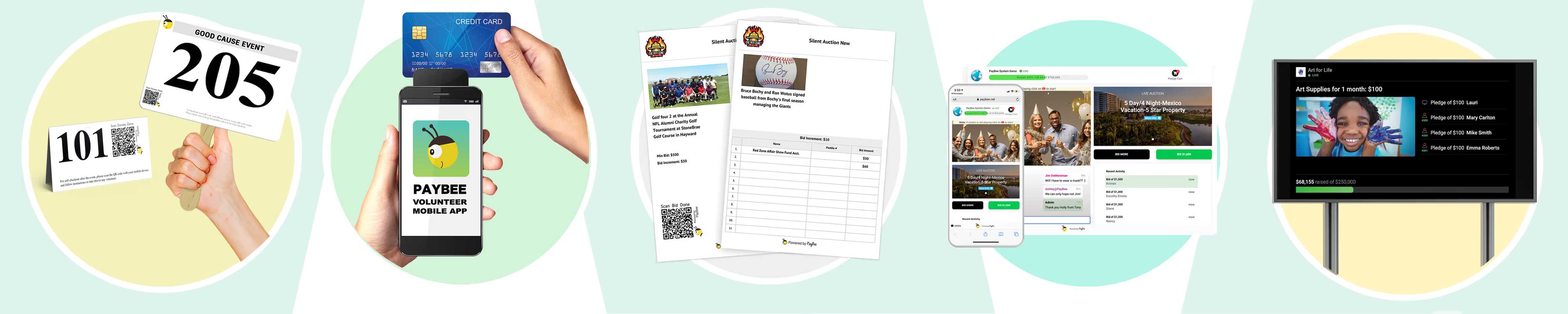
If your team already runs events, ticketed fundraisers, auctions, or campaigns, saving on tools helps, but bringing more structure to fundraising matters too. This is where PayBee comes in. It supports ticketed events, auctions, livestream campaigns, and donor tracking in one place, which reduces the number of disconnected systems you're juggling.
For a new executive director or a volunteer treasurer, discovering nonprofit discounts feels like a small but meaningful shift. It doesn’t solve every budget challenge, but it does remove one steady expense so you can focus more on services, donations, and fundraising.
What Are Nonprofit Discounts?
Nonprofit discounts are lower rates that companies give out to verified nonprofit organizations. They’re not grants. They’re not donations. They’re adjusted pricing tied to charitable status.
You'll see nonprofit discounts most often in these areas:
- Productivity and communication suites (professional email, shared documents, calendars, team chat)
- Video conferencing for meetings, classes, support groups, or virtual fundraising events
- Design software to create flyers, social graphics, annual reports, or campaign materials
- Cloud storage and basic website tools, including donor management features
- Office supplies, shipping discounts, and hardware through business accounts
Discounts typically show up as 50 to 75 percent off standard pricing, bundled nonprofit plans, or access at no cost for basic tiers. Some providers donate products. Others reduce pricing for specific plans. Some offer a limited tier for free, then discounted upgrades as your nonprofit needs grow.
To qualify, you generally need proof of nonprofit status, such as a 501(c)(3) determination letter in the United States or equivalent documentation. For-profit entities pay full price, which makes the difference clear for budget-conscious nonprofit organizations.
Benefits of Nonprofit Discounts for Organizations
The main benefit is direct. Lower operating costs mean more resources are available for programs and services. That allows nonprofit organizations to direct more donations toward programs instead of software expenses.
The real shift isn’t just the savings. It’s what changes inside the organization. Fewer last-minute cancellations because a free plan capped attendance. Fewer file access issues when a volunteer leaves. Fewer conversations about downgrading tools right before a campaign. When systems are stable, the team spends less time patching holes and more time serving people.
That steadiness is what makes small organizations stronger over time.
The tools themselves also make daily operations smoother. Shared documents update in real time. Staff stop emailing attachments back and forth. Video meetings stay stable during conversations with donors and volunteer training. Graphics and reports look consistent, which helps with branding and makes donor communications feel more professional. The savings don’t need to be dramatic to matter.
Practical ways these discounts show up include:
- Redirecting subscription money back into program supplies, transportation, or volunteer support
- Fewer internal emails asking who has the latest version of a document
- Trying a basic donor database or email campaign without signing a large contract
- Reports and outreach materials that look consistent instead of rushed
- Video meetings that don’t drop halfway through a session
- A little more breathing room in the budget during slower fundraising periods
For smaller or newer nonprofit organizations, these adjustments don’t overhaul operations. They make the day-to-day feel more manageable.
How to Qualify for Nonprofit Discounts
Qualifying for nonprofit discounts is less complicated than it sounds. Most providers aren’t trying to exclude smaller nonprofit organizations. They just need documentation.
Start with your core paperwork. That usually includes your IRS determination letter or equivalent nonprofit registration, your EIN or tax ID number, and your official legal name. If your organization has restructured, merged, or rebranded, make sure everything matches across documents. Small mismatches can slow down the approval process.
Many nonprofit organizations begin with TechSoup. You create an account, upload documentation, and wait for verification. Approval often takes one to four weeks. During peak periods, it may take longer.
Once verified, you can access nonprofit discounts through the TechSoup catalog. Some nonprofits choose to hande the application themselves. In either case, the steps are similar.
What to Gather Before You Start
Keep it simple. You're aiming for a clean, complete application package.
- Determination letter or nonprofit registration proof
- EIN or tax ID number
- Legal name and address as it appears in official records
- Articles of incorporation, if requested
- A shared folder where these documents live long term
A shared folder matters more than people think. Staff turnover is common in small nonprofit organizations. If documents are locked inside one person’s inbox, the organization ends up wasting time tracking things down.
Where Things Usually Slow Down
Most delays come from internal organization, not the provider.
- The determination letter is in a former director’s email account.
- The EIN is correct, but the legal name doesn’t match exactly.
- The address on file is outdated.
- No one “owns” the process, so it ends up unfinished.
If your nonprofit operates under fiscal sponsorship, confirm whether you apply independently or through the sponsor. Some providers allow sponsored projects to apply directly. Others require the sponsor’s documentation and account ownership.
What If You Are Denied?
A denial doesn’t necessarily mean a closed door. It often means missing documentation, a mismatch in records, or a request for clarification. Read the reason, fix what’s fixable, and try again.
If a provider excludes certain types of organizations, accept it and move on. Spending weeks trying to force a fit rarely pays off when there are plenty of other discounts available.
Plan Before It Is Urgent
Waiting until you’re launching a fundraising campaign, onboarding staff, or preparing a major event isn’t ideal. Complete the verification process during a slower period when there’s time to focus and when the proverbial clock isn’t ticking.
Store documentation in a shared folder. Assign someone to monitor renewals. Many nonprofit discounts require annual reconfirmation. Missing that deadline sometimes triggers a pricing reset back to standard rates.
The process is administrative, not technical. Once you get used to it, it becomes routine.
Top Companies Offering Nonprofit Discounts
There are many nonprofit discounts available. The key is choosing tools that genuinely support your operations instead of adding more logins to manage.
Below are common providers and what they look like in day-to-day use.
Google for Nonprofits
Google Workspace is often provided at no cost for eligible nonprofit organizations. That includes professional email, shared Drive storage, collaborative documents, and video meetings.
For small teams, this replaces scattered personal accounts with a centralized system. Shared calendars reduce scheduling confusion. Shared documents reduce version issues. It’s straightforward and reliable.
If your organization grows, you may want more storage or advanced admin controls, but many small nonprofit organizations operate comfortably within the standard nonprofit plan.
Microsoft Nonprofits
Microsoft provides discounted or no-cost Microsoft 365 subscriptions. This includes Word, Excel, PowerPoint, Teams, and OneDrive.
Microsoft often fits organizations that live in spreadsheets, grant reporting templates, and board packets. If your team already uses Excel a lot, the workflow feels familiar. It also helps when outside partners expect Microsoft formats.
Some organizations end up using both Google and Microsoft. That’s possible, but it also introduces overlap. If you choose a mixed setup, assign a clear purpose for each tool so staff aren’t split across two systems for the same tasks.
Adobe
Adobe offers discounted Creative Cloud access for nonprofit organizations. It’s especially useful if you produce annual reports, event materials, or consistent fundraising graphics.
This is often where small nonprofits see a quality upgrade. Even simple templates improve visual consistency, which supports marketing, sponsorship asks, and donor communications.
Adobe discounts aren’t always fully free. They’re usually reduced pricing. Plan for that, and confirm what’s included before committing.
Zoom
Zoom offers reduced pricing for nonprofit organizations. Reliable video supports remote services, volunteer training, board meetings, and hybrid fundraising events.
Video issues frustrate participants quickly. If online sessions are part of your services, stability matters. Know your meeting lengths, participant limits, and recording needs before selecting a tier.
Slack
Slack offers discounted nonprofit plans. For very small teams, email might be enough. But when you have active volunteers, committees, or people working remotely, a shared messaging space can help keep conversations organized and easy to find later.
Adopt it only if it solves a real communication problem. Too many communication channels create their own mess.
Amazon Business for Nonprofits
Amazon Business for Nonprofits provides improved shipping rates and pricing on supplies. Savings vary, but they add up if your organization orders program materials, office supplies, and event items regularly.
This is a practical discount, not a transformational one. It’s most useful for organizations that already purchase supplies frequently.
CRM and Donor Management Tools
Many CRM (Customer Relationship Management) providers offer nonprofit discounts. These platforms track donations, segment supporters, support email marketing, and reduce reliance on spreadsheets.
They also require ownership. A discounted CRM still needs someone to set it up, clean the data, and run the day-to-day work. If no one takes charge, it becomes a contact list no one trusts.
If your organization isn’t ready for a full CRM, start smaller. A basic donor database and clean export habits are still a move forward.
Some nonprofit organizations use general-purpose CRM systems such as:
- Salesforce for Nonprofits – Offers nonprofit licenses with tools for tracking donors and volunteers.
- HubSpot for Nonprofits – Provides discounted CRM and email marketing tools for managing contacts.
- Trello – Discounted project management boards for organizing tasks and campaigns.
These tools help manage contacts or internal work. Paybee is built for fundraising. It brings events, auctions, livestream campaigns, donor tracking, and payments into one place, which makes running a campaign feel more organized and less stitched together.
Choose What Solves a Real Need
Start with tools that replace an existing expense. Then evaluate whether each platform supports your services, volunteer coordination, donor management, or fundraising workflow.
Nonprofit discounts work best when they make day-to-day operations easier. They’re less helpful when they just make things more complicated.
Strategies to Maximize Nonprofit Discounts
Discounts help most when you treat them as part of operations, not a one-time win.
1. Audit What You Already Pay For
Before you add anything, list your current subscriptions. Most small nonprofit organizations discover at least one of these:
- Two tools doing the same thing
- A subscription no one uses
- A subscription billed annually that everyone forgot about
- A paid plan where the nonprofit plan offers the same features
This audit often saves money immediately, even before you apply for new discounts.
2. Prioritize the Biggest Pressure Points
Start with what causes friction.
- Email and document storage issues
- Video meetings that drop or cap attendance
- Donor tracking that’s scattered
- Design needs that lead to repeated contractor costs
If you fix one pressure point well, everything else gets easier.
3. Avoid Overlap
Overlap is common. Google plus Microsoft plus a third storage system plus a separate video tool.
Some overlap is unavoidable. Most of it is optional.
Pick a primary system for documents and communication. Then build around it.
4. Assign Ownership
Discounted tools still need management. Someone needs to:
- Own renewals
- Manage user access
- Store documentation
- Decide which plan is still worth keeping
When ownership is unclear, updates get missed and problems pile up.
5. Put Renewal Dates on a Calendar
Set reminders 60 days before renewal, not the week before. This gives you time to reassess and prevent surprise full-price billing.
6. Build Savings Into Your Budget
When savings are real, they deserve a budget line. If nonprofit discounts save $1,200 a year, decide where that money goes.
Program supplies. Community services. Volunteer support. A marketing budget. A buffer.
Savings that are invisible get absorbed without improving anything.
Trends in Nonprofit Discounts
Nonprofit discount programs aren’t changing overnight, but a few shifts are noticeable.
More Bundled Plans
Bundled plans are more common. Instead of paying separately for email, storage, and collaboration, nonprofit organizations often access those services under one adjusted plan. This helps because fewer subscriptions means fewer renewals to track.
More Built-In Time Savers
Some providers are adding small features that save time, such as automatic meeting notes, document suggestions, and simpler editing tools. For small teams, these features matter because there isn’t extra staff to take on administrative work.
Eligibility Is Loosening in Some Programs
Some programs are expanding eligibility to include smaller organizations, newer nonprofits, and in some cases fiscally sponsored projects. The rules still vary by provider, but it’s worth checking even if your organization is new.
Security Features Are Becoming Standard
As nonprofit organizations handle more donor data, payment information, and participant records, providers are improving admin controls and security options within nonprofit plans. Two-factor authentication, permissions, and basic security dashboards are more commonly included.
These trends don’t change operations on their own. They make tools easier to use and easier to manage, which is often what small nonprofits need.
Challenges in Accessing Nonprofit Discounts
Most nonprofit organizations qualify for at least some discounts. The bigger challenge is follow-through.
Paperwork Takes Time When Files Are Scattered
If documents live in multiple places, verification takes longer than it should. This happens more often than people admit. The fix is boring but effective: one shared folder, clear labeling, and someone responsible.
Awareness Is Low
Many small nonprofit organizations assume discounts are only for larger groups. That assumption leads to years of paying full price without checking.
Regional and Provider Limits
Some offers are US-centric. Others require documentation formatted in specific ways. International organizations sometimes face extra steps.
Renewals Get Missed
Renewals are where many groups get caught. A discounted rate expires. The notice goes to an inbox no one monitors. The account reverts to standard pricing. The budget absorbs it quietly until someone catches it.
Signing Up for Too Much
Once verified, it’s tempting to claim every offer. Even discounted tools take time to manage. If a tool doesn’t solve a current problem, it becomes another login instead of a real improvement.
Most of these challenges are avoidable with simple structure. Assign ownership, track renewals, and review subscriptions once a year.
FAQs on Nonprofit Discounts
Does Google offer nonprofit discounts?
Yes, it does. Eligible nonprofit organizations can get Google Workspace at no cost after verification. Some groups also qualify for advertising credits, depending on the program and how it’s set up.
What discounts do 501(c)(3) organizations usually get?
It varies, but many nonprofits receive reduced pricing or included plans from companies like Google, Microsoft, Adobe, Zoom, CRM providers, and even supply vendors. Most of the time you’ll go through TechSoup or apply directly on a provider’s nonprofit page.
How do nonprofit organizations get software discounts?
In most cases, you verify your charitable status through TechSoup or directly with the company. Once you’re approved, you can apply for the tools you actually need. Keeping your documents organized in one shared folder makes the process much smoother the next time around.
Is there a nonprofit discount for Amazon?
Yes. Amazon Business for Nonprofits offers better shipping rates and pricing on certain supplies for verified organizations. It’s not dramatic savings for everyone, but it can add up if you order regularly.
Are nonprofit discounts the same as grants?
No, they’re different. Grants bring money into your organization, often with reporting requirements. Nonprofit discounts lower what you’re already spending on tools and services. Both help, just in different ways.
How long does verification usually take?
It’s often one to four weeks, depending on the provider and the time of year. If you can, start early so you’re not waiting on approval right before a campaign or event.
Bringing It Together
Nonprofit discounts lower operating costs so more donations and fundraising revenue can support programs. They aren’t flashy. They’re practical.
- When fundraising is part of your work, the right software matters. Paybee gives nonprofit organizations a dedicated system for events, auctions, livestream campaigns, and donor tracking, so fundraising isn’t scattered across spreadsheets, ticketing tools, and payment processors.
Nonprofit discounts help lower costs. Choosing tools that are built for the work helps lower stress. Together, that’s what makes operations feel manageable instead of reactive.
Related Reading
- What Is Adobe for Nonprofits? – A simple guide to Adobe’s Creative Cloud discounts and how they can help with your design needs.
- A Guide to Zoom for Nonprofits – Easy tips on Zoom’s reduced pricing and features that work great for virtual meetings and events.
- Free Nonprofit CRM Solutions: Our Complete Guide to Nonprofit CRMs – A friendly overview of donor tracking tools to help you move beyond spreadsheets.
Start Fundraising
 Paybee
Paybee is the leader in nonprofit fundraising events with tools for virtual, hybrid and in-person events.


