


Is Givebutter Really Free? Tipping Models vs. Flat-Fee Fundraising Pricing
Every nonprofit wants to limit fees and other expenses so the money they raise can be used to move their actual mission forward. So when a platform has a pitch that says they have zero subscription fees and zero platform fees, most charities take notice, and for good reason!
But is this really what you pay at the end of the day?
Key Takeaways
- Tip-Supported Model: Givebutter is free for non-profits when optional donor tipping is enabled. Donors are presented with a voluntary tip prompt at checkout, which goes directly to Givebutter to fund platform operations.
- The Givebutter Guarantee: When tips are enabled, Givebutter absorbs any transaction processing fees that donors choose not to cover, ensuring the non-profit retains 100% of its raised funds.
- Standard Pricing (Tips Off): If a non-profit turns off tipping, Givebutter charges a standard 3% flat platform fee across all campaign types (forms, pages, events and auctions) for accounts created on or after September 9, 2025.
- Legacy Tipping-Off Tiers: Accounts established prior to September 9, 2025, retain legacy pricing of 1% for donation forms, 3% for fundraising pages and 5% for events/auctions when tips are disabled.
- PayBee Model: PayBee utilizes a traditional software pricing structure featuring a 2% flat platform fee, lower baseline processing rates, and configurable fee-coverage options without donor tipping prompts.
- 2026 Lawsuits: Two pending proposed class actions allege that Givebutter added tips and processing fees without proper disclosure or donors’ affirmative consent.
While Givebutter can indeed offer zero out of pocket costs for your organization, to achieve this you’ll need to understand that their cost structure depends heavily on whether you rely on donor tips or traditional processing models. And yes, there’s a big difference.
Understanding how tip-based pricing can directly impacts your donors and then comparing it to flat-fee platform like Paybee is important when it comes to protecting donor retention and deciding which platform will be your best option long term. Once you start with one platform, you don’t want to change to a different one later!
How Givebutter's Pricing Structures Work
In order to cover Givebutter’s platform costs, you have two different options and they both have to do with their ‘tips’ structure. Either you pay to use the platform through a flat fee structure with ‘tips’ turned off, or you can push the costs onto your supporters by turning their ‘tips’ option on. Either way, someone is covering their fees, it’s just who you decide.
‘Tips’ are actually the fees that Givebutter would normally charge you if you decided not to use this option. When it is on, your donors will go to a checkout page with the tips included in addition to their original donation. We give a real life scenario below as it can be a bit confusing.
Option 1: Optional Tips Enabled (The Tip-Supported Model)
When optional donor tips are turned on:
- Platform Fee: $0% charged to the nonprofit.
- Donor Experience: Donors see an optional tipping prompt during checkout asking them to approve this fee to support Givebutter's software. Donors are offered the option to adjust the tip amount, choose a custom tip or remove the tip entirely before they checkout. Which ever amount your supporters decide to give, all tips go directly to Givebutter and are never deducted from the nonprofit's donation.
- Processing Fee Handling (The Givebutter Guarantee): The actual fees donors are asked to cover are $2.9% + $0.30 for credit cards and $1.9% + $0.30 for verified nonprofit ACH.
- If a donor declines to cover processing fees and you have tips turned on, Givebutter covers the cost under the Givebutter Guarantee so you can still capture 100% of the donation.
Option 2: Optional Tips Disabled (The Platform Fee Model)
If you decide you do not want to ask your donors to cover Givebutter’s fees, then you assume the fees just like any other platform. The pricing structure then depends on when your account was created:
- Standard Accounts (Created on/after Sept 9, 2025): A flat 3% platform fee applies across all campaign types including forms, pages, events and auctions.
- Legacy Accounts (Created before Sept 9, 2025): Accounts operate on legacy tiers: 1% for Donation Forms, 3% for Fundraising Pages and 5% for Events/Auctions.
So when tips are disabled, standard processing fees of 2.9% + $0.30 for credit cards and 1.9% + $0.30 ACH fees must be paid by your organization.
Either way Givebutter is not free, it is just who the nonprofit decides to pay the fees. They can either choose to make fee coverage optional for donors, require donors to cover fees or they can decide to absorb the fees themselves.
Hypothetical Checkout Scenario
This is where pricing can get a bit tricky or complicated since total checkout costs vary based on campaign configurations and donor choices, which in turn means there is no single fixed transaction cost. This can make it extremely difficult when trying to compare Givebutter’s costs against other platforms like Paybee.
So to make things clear, let’s take a hypothetical example of a $100 credit card contribution under the different campaign settings to see what charges will actually be paid by someone.
- Scenario A (Tips On, Donor Accepts All Defaults): If a campaign has tips enabled and a donor opts to leave a default $15.00 ‘tip’ while also agreeing to cover the processing fees which would come to $3.20, the total checkout amount would be $118.20. Your nonprofit would receive the entire $100 donation while Givebutter receives the $15.00 tip and the $3.20 goes to payment processing.
- Scenario B (Tips On, Donor Removes Tip & Processing Cover): If a donor modifies their selection to a $0 tip and also opts out of covering the processing fees, the donor pays only $100.00 in total. But now under the Givebutter Guarantee, your nonprofit still receives the full $100 and Givebutter eats the cost.
- Scenario C (Tips Off, Standard $3\%$ Platform Fee, Non-Profit Absorbs Costs): If tips are disabled and the organization chooses to absorb all transaction costs on a $100.00 credit card contribution, the donor pays $100.00. Givebutter deducts the 3% platform fee ($3.00) alongside standard credit card processing ($3.29), leaving your non-profit with a net total of $93.71.
What the 2026 Givebutter Lawsuits Allege
But would donors notice those extra charges before paying, or know how to remove them?
That’s the question behind two proposed class actions filed against Givebutter in 2026, with donors saying they paid tips and processing fees they hadn’t knowingly agreed to.
Both cases remain pending, so those claims are allegations rather than court findings.
Let’s look at the donations behind the complaints and what your nonprofit can learn from them.
McClintock v. Givebutter

For your supporter, saying yes to a $20 donation shouldn’t mean saying yes to charges they haven’t noticed.
On December 19, 2023, Whitney McClintock set out to give $20 to Ann's Heart, a local nonprofit that pitches itself a place of welcome and human services.
Her original complaint says the total reached $23.91 after a $0.91 processing fee and a $3 tip she hadn't agreed to. She says she didn't know either charge could come off and would have declined both.
- The complaint mentions that small print makes it clear the tip is optional
- It points out that Givebutter didn't make it easy for donors to realize the tip had already been added
- Even if a donor notices the extra charge they still want to know what those charges really pay for
McClintock challenges the labels too, alleging that fees described as processing costs and tips said to support free fundraising brought Givebutter a profit.
Whitney’s account gives you a reason to look at your checkout through a supporter's eyes.
Can they tell what goes to your organisation, what goes to the platform, and how to decline the extras before their card is charged?
Summeril v. Givebutter
With monthly giving, an unnoticed extra can turn up on the next payment too. In Summeril v. Givebutter, filed by four donors in California federal court on August 4, 2026, two plaintiffs describe charges they say they hadn’t agreed to:
Ebony’s case:
Ebony Baker enrolled in $5 monthly donations to HD Supply Charitable Fund around October 7, 2025. She alleges that each payment included a $0.46 processing fee and a $1 tip she hadn’t agreed to, bringing it to $6.46.
Lynette’s case:
Lynette Hubert began giving $25 a month to the Brian Grant Foundation on January 8, 2026. She alleges that Givebutter added a $1.31 processing fee without her consent, taking her payment to $26.31.
Both women say they would have declined the disputed extras had they known they could.
The complaint says that removing the processing fee required the user to find a hidden "edit" link, read a warning and uncheck a box.
There's three key lessons to learn from this case:
- Before we ask supporters to give every month your team can look at the form to see if the form clearly shows the recurring payment
- A processing fee or tip should be something that supporters know they are choosing
- There should be a clear way to decline the processing fee
TINA.org’s Checkout Investigation
Outside the lawsuits, consumer watchdog Truth in Advertising (TINA.org) examined the same concern: how easily could a donor spot and remove the extras?
Its June 1, 2026 investigation looked at a Givebutter donation form for MilVet, a California nonprofit supporting members of the military and veterans.
For someone entering a donation of $500, the form automatically added:
- A $75 tip to Givebutter, set at 15%
- A processing fee of $15.24
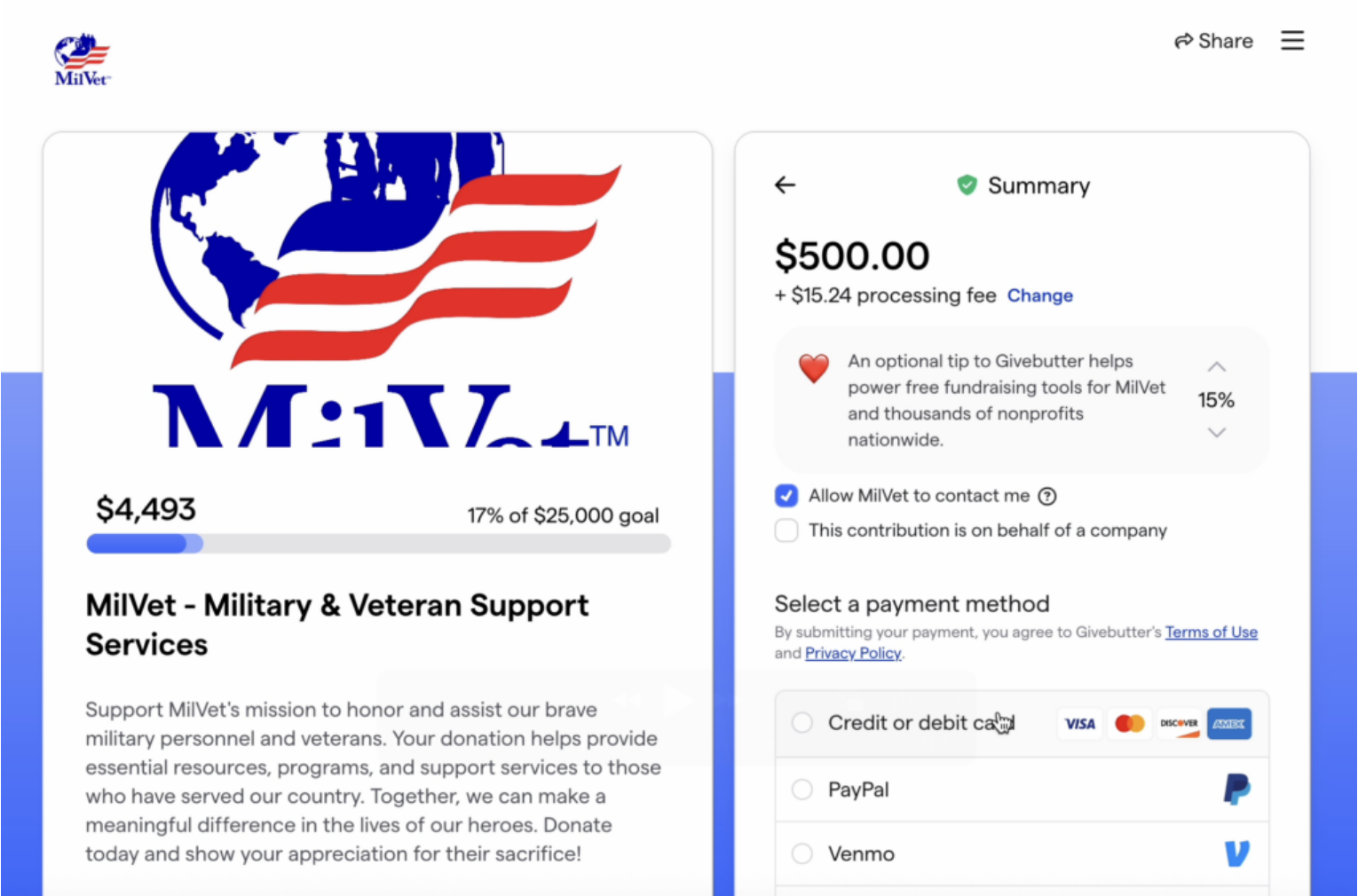
Together, those extras brought the total to $590.24. Yet TINA.org reported that the full amount appeared only after the donor entered their payment information, while the tip appeared as a % rather than a dollar amount.
According to the watchdog, the choices to remove both extras were also easy to miss. And even someone who found the fee-removal option could still wonder whether declining it would leave the nonprofit out of pocket.
Under Givebutter’s Standard pricing, its Guarantee covers processing fees donors decline on eligible transactions when tips are enabled, so the nonprofit receives the full intended gift.
But TINA.org reported that the message shown when donors tried to get rid of the fee didn’t explain that protection.
Without that explanation, how would your supporter know they could decline the extra payment without reducing their gift to your nonprofit?
If a Supporter Requests a Tip Refund
If a supporter notices the tip only after paying, they may still want their donation to reach your nonprofit. In that situation, Givebutter says it can refund a tip left by mistake without reversing the gift.
Your team can help them find their receipt and explain what Givebutter’s support team needs:
- The donation reference number shown on the receipt
- A written request asking for the mistakenly added tip to be refunded
For this request, Givebutter directs both donors and campaign administrators to its support team, rather than the nonprofit’s dashboard refund option.
If the supporter wants the whole donation returned instead, they can contact your organisation or Givebutter support. So before your team starts arranging a refund, it helps to establish whether they want the gift returned or the unexpected tip removed.
What Your Nonprofit Can Learn From These Complaints
Even when your nonprofit receives the full intended gift, an unexpected extra can still leave your supporter looking to your team for an explanation.
In Give.org’s 2026 report on online giving platforms, 53% of surveyed platform users cited transparency about fees and how funds are used as a reason to trust a platform.
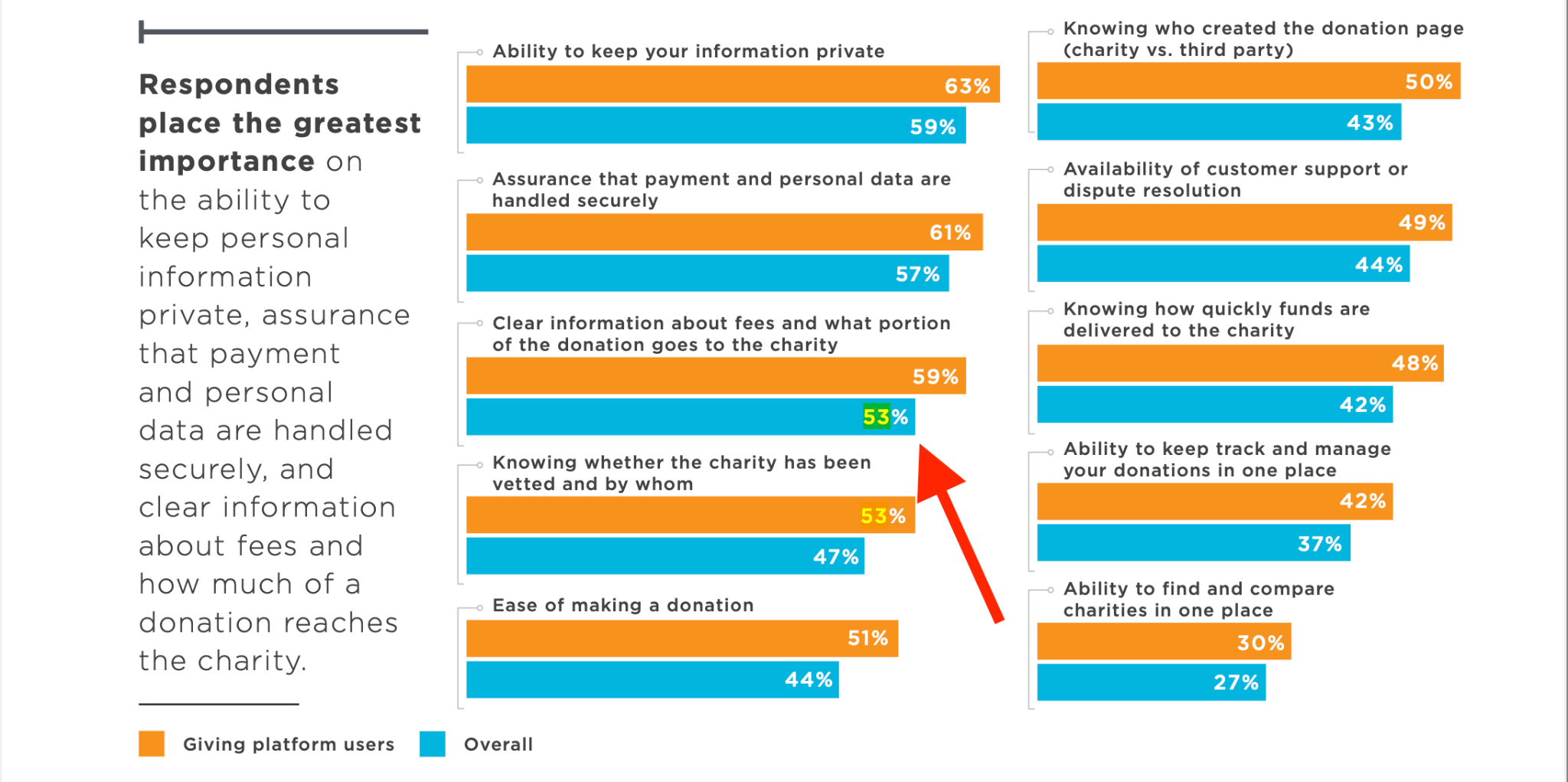
In addition, only 13% considered total charges above 15% acceptable, including processing fees, tips and optional contributions.
Whether you’re comparing platforms or preparing your next appeal, your team can try these three checks on a sample or existing donation form:
- A fresh pair of eyes. A colleague who didn’t set up the campaign goes through the form and explains what they expect to pay and where each amount goes.
- A monthly-gift test. Your team compares the recurring donation with the total shown, including any extras that will repeat on later payments.
- A record to refer to. Screenshots of the checkout and its settings give your team something concrete to consult if a supporter queries a charge.
If that colleague needs coaching to understand the checkout, you’ve found something to discuss with the platform before donors encounter it.
From there, you can compare Givebutter with PayBee on both sides of the checkout: what supporters pay and what your nonprofit receives.
Givebutter vs. PayBee: Comparing Platform Approaches
Rather than one platform being strictly higher or lower in cost, Givebutter and PayBee represent two fundamentally different philosophy models in fundraising software.
Tipping vs. Voluntary Fee Cover: Impact on Donor Experience
A very important difference between Givebutter and Paybee is not just their numbers, but how they represent those numbers to your supporters.
- Givebutter's Tipping Prompt: Asks donors to leave an extra tip to support Givebutter's operating costs creating an unknown third party on your checkout page.
- Paybee's Voluntary Fee Cover: Asks donors if they would like to add a small amount of 3.5% to directly cover your nonprofit's administrative and processing costs. Your donors see it as going towards helping your nonprofit and not to a software company.
There’s plenty of data out there that shows donors are willing to cover some of your operational costs as an added bonus to their gifts if they see it all going to your organization’s mission rather than a third party software company. And while this may all be synamtics, it does matter!
We have found here on Paybee that around 90% of donors voluntarily choose to cover the transaction fees when asked. This can help reduce your final costs to less than 1% overall without even requiring ‘tipping’ prompts.
Furthermore, we also offer significantly lower underlying transaction rates:
- Lower Credit Card Processing: 2.7% + $0.30 vs. Givebutter’s 2.9% + $0.30.
- Cheaper ACH / Bank Transfers: A flat 1.3% vs. Givebutter’s 1.9% + $0.30, which does matter, especially for major gifts.
Summary: Which Platform Should You Choose?
- Givebutter is best suited for: Early stage non-profits, small grassroots groups or tight budget campaigns that need $0 software overhead and don't mind presenting a tipping prompt during checkout.
- Paybee is best suited for: Established nonprofits that need to offer their supporters galas, hybrid auctions and major donor campaigns that prioritize a clean donor experience, lower ACH/credit card processing rates and transparent, predictable flat fees.
Frequently Asked Questions
- Q: Is Givebutter free for non-profits?
- A: It depends. If Givebutter’s optional donor tipping is enabled, whether a donor does or does not tip, the platform is still free for the nonprofit, even if donors opt out of covering processing fees. However, your nonprofit can opt out of the tipping scenario and just decide to cover the fees, but in this situation Givebutter is not ‘free.’
- Q: What platform fee does Givebutter charge if tips are turned off?
- A: For accounts created on or after September 9, 2025, Givebutter charges a flat 3% platform fee across all campaign types when tipping is disabled. Legacy accounts created before that date pay 1% for donation forms, 3% for fundraising pages or 5% for events and auctions.
- Q: Are donors required to leave a tip on Givebutter?
- A: No. Tips are entirely optional. Donors can even change the tip amount or even set it to zero. If they do leave a ‘tip,’ whatever the amount, including above the actual fees, Givebutter keeps.
- Q: Does Givebutter offer discounted ACH processing?
- A: Yes. Givebutter charges a reduced ACH processing fee of 1.9% + $0.30 for verified nonprofits that can show documentation of their IRS 501c status.
Conclusion
Pricing is always a top priority for any nonprofit organization, especially Is you’re just starting your charity. So when you see ‘free’ in a platform’s advertising, it should definitely be one to check out. But one thing to always remember, software platforms have costs, there are coders, servers, support staff among a thousand other expenses, and unless someone covers all of them, the company will cease to exist.
And yes, Givebutter has a way to make their platform free for the nonprofit founder, but it is still your donors that are absorbing the cost. If this doesn’t matter to your organization, then they are a strong contender. But if you don’t want to strap your supporters with additional fees while they’re making a contribution, or making tipping requests to fund a third party software provider, it may be much easier and beneficial to just go with a standard flat fee cost solution like Paybee.
Although the 2026 allegations remain unproven, they give your team another reason to check whether supporters understand and agree to the extra charges before paying.
If you’d like to sign up for our free demo, we can walk your through our system so you can see exactly what your donors see at checkout, how fee coverage options are presented and how processing costs scale so you can make a very informed decision when it comes to your own long term fundraising growth. Sign up here now, it only takes a minute!
Start Fundraising
 Jason Donegan
Jason is a seasoned technical writer and analyst. He loves all things niche websites, SEO, and digital marketing. In his free time, he is learning something new about this industry or sifting through domains for his next project.