


Online Fundraising for Nonprofits: Everything You Need to Know in 2026 (Strategies, Tools & Examples)
TL;DR: What is Online Fundraising for Nonprofits?
Online fundraising is the strategy nonprofit organizations use to raise money for various programs through the internet. There are five main methods institutions use, including donation forms or pages, email campaigns, social media fundraising, peer-to-peer drives, and mobile or SMS campaigns.
In some regions, digital fundraising accounts for up to 60% of all charitable donations, and online channels give groups incredible versatility to build strategies that combine multiple mediums that boost both engagement, and support. In fact, often the best results come from combining all five channels, using a system like PayBee, Fundraise Up, Givebutter, Classy, Give Lively, or Donorbox.
Why Online Fundraising Matters in 2026
Online fundraising has become the default method for charitable giving in 2026, it helps organization meet the growing needs supporters and contributors have when it comes to speed, convenience, and even tracking, or sharing their own altruistic activities.
Tech-savvy supporters expect to be able to show their love for the movements and programs they care about in a way that suits them. Some studies even show that about 13.4% of a small nonprofit’s total revenue will typically come from online giving.
Elsewhere, M+R found that 37% of annual online revenue arrived during December in 2025. December 31 accounted for 4% of the entire year. GivingTuesday added another huge test, pulling in $4 billion across the US in a single day.
Still, online fundraising doesn’t just appeal to givers, it’s great for nonprofits managing complex campaigns too. With the right platform, you can encourage peer-to-peer activism, among groups who want to share their values with the world, or enable recurring giving through simplified monthly donation features that don’t force users to keep re-entering the same details.
Some platforms also give you reporting and analytics tools, so your teams can use data to personalize follow-up campaigns with your supporters, make sure the right people are invited to the most relevant events, or simply keep people updated about what you’re doing next.
Plus, online fundraising helps boost transparency too. As soon as someone makes a donation, they can see the payment confirmed, then revisit your website to learn more about how their funds are taking you further towards your goals.
The 5 Channels of Online Fundraising
Online fundraising gives you a lot of options, not just in terms of the types of fundraising events you can run either. Yes, you can experiment with everything from online auctions to virtual raffles, but you can also spread your strategy across different channels.
You don’t need to give each one an equal amount of attention or budget. Really, your method should match the kind of nonprofit you are. A school auction committee doesn’t have much in common with a national advocacy group, for instance. The sensible collection depends on where your supporters already spend their time, and what might be stopping them from taking the next step.
Donation Forms and Fundraising Landing Pages
With a form or fundraising landing page, groups tend to create an appeal page or website first, then the form is there to take the payment or log the signup.
Quite a few fundraising platforms give you templates you can customize here, but it’s always important to get the basics right. Focus on required fields first. You don’t necessarily need someone donating $25 to give their phone number, post code, and a full explanation of exactly where they heard about your organization.
The simpler the form is, the more likely it is people will actually want to fill it out. Add some helpful nudges to make things simpler, like:
- Suggested amounts, with a description of what the exact amount covers, such as “$50 gives a family groceries for a week.”
- Mobile support, mobile phone generated about 52% of nonprofit website traffic in 2025, so make sure the form or page still works on a smaller screen.
- Multiple payment choices. Not everyone wants to share their credit card details, even with a reputable nonprofit organization. Offering alternative options like PayPal, Google Pay, or Apple Pay could help counteract the feeling of risk.
You can also get experimental with things like custom donation levels for people who have a certain budget to spend, QR codes people can scan and share with their friends, or monthly giving options with various tiers.
Remember to promote both your appeal page and your forms at the same time, too. You don’t even have to spend much to do that. Google Ad Grants gives nonprofits up to $10,000 per month for free search advertising.
Email Fundraising
There are a few critical things to consider with email fundraising, starting with segmentation. Your supporters don’t all need or want the same thing. A monthly donor who’s been giving you their extra money for seven years doesn’t want the same email as someone who bought two gala tickets, or one of your volunteers who hasn’t donated anything but their time.
That doesn’t mean email fundraising doesn’t work though. M+R benchmarks says that fundraising messages earned about $54 for every thousand emails sent in 2025.
All you need is a plan for grouping the contacts you have. You might have one group for first time donors, ongoing donors, lapsed supporters, volunteers, event guests, and one for people who visited your last event page, shared their address, but didn’t actually give anything.
Once you’ve got your segments, think about the campaign flow. It needs to move the story forward. The first email may explain the mission you’re collecting for; the second can show the work you’re doing, and a third can make a request for support.
Aftercare is important too. When someone does make a donation, give them a receipt covering the tax record and the amount they paid. Donor engagement tends to grow when institutions keep people informed, remember their interests, and regularly earns the right to check in again.
Social Media Fundraising
Social media can be a tricky place for fundraising. On the one hand, you’ve got access to a thriving community of people who might already support your cause. On the other, you’ve got specific rules you need to think about, and the fact that on social, you don’t get full control.
Every social media platform rents attention by the hour, and your audience can quickly disappear after an account restriction, or an algorithm change.
Those platforms are still worth using, though, especially if you know which one works best for each strategy or nonprofit type.
Facebook is one of the most common options, especially for quick auctions, birthday campaigns and live streamed events. It’s great for schools, churches, or neighborhood groups, and it even has native fundraising tools built-in to help you collect payments. Many fundraising platforms offer integrations with it, too.
Instagram tends to be a popular pick when the cause has something visual to show off. If you’re constantly collecting short clips of your volunteers at work, images of your latest raffle prices, or photos of events, then Instagram can definitely work. So can TikTok, where people are already shopping, spending money, and actively supporting community members.
LinkedIn can help with sponsorships and board introductions. It’s also a useful choice if you’re looking for people to host or support your next event, or you’re running a campaign that invites employees and team members to give something back.
X is less ideal for a full fundraising campaign, but it can be a good choice if you want to keep people up-to-date with short news-worthy insights and quick links to campaigns or any money-raising goals you’ve achieved lately.
Mobile Fundraising and SMS
Mobile fundraising is one of the bigger areas worth focusing on in 2026. The European fundraising association found 58% of one-off donations were made on mobile in 2025. A text sent to a happy supporter at just the right moment can easily pull in money. The key is making every message count.
Few people will immediately respond to “please support our mission”, but if you tell them that an auction is closing in fifteen minutes, or you’re about to achieve a major goal with the help of just a few more supporters, that changes things.
You don’t necessarily need to reach out to thousands of supporters through SMS. You can launch a text-to-give campaign and share it on social media, in person, or on your website. You can bring a QR code or mobile number to your next event and let people bid for items through their phone, too.
Mobile phones are very popular at silent auction events, and you can use the software you choose to support not just bidding, but also sending closing messages and deadlines to supporters.
Mobile fundraising also works well for raffles and event-day sales, particularly if you want to make sure people who couldn’t attend in-person can get involved, or you want to avoid having too many people crowding around a bid table at once.
Whenever you’re using text or mobile strategies though, remember to follow the rules. You need to keep consent records, identify yourself clearly whenever you send a message, and make it easy to opt-out. Also, don’t make the messages complicated.
A single text should ask for a single action. Don’t just send a supporter to your homepage and make them search for the campaign you’ve been telling them about.
Peer-to-Peer Fundraising
Peer-to-peer fundraising borrows trust from existing supporters. Potential donors will often ignore emails or messages from an organization they don’t know, even if the mission is great. They’re less likely to ignore a message from a friend or relative asking them to donate $30 for a sponsored walk.
Really, it’s getting the software right that makes the biggest difference here. There are a lot of platforms that celebrate registrations, while most of the crucial pages stay untouched. A participant sees an empty profile, a blank story field, and a thermometer set at $0, and the nonprofit wonders why they never shared it with their community.
Give your contributors a head start instead. Make sure there’s a short story about their mission they can edit with their own stories. Provide a few photographs, an email for close contacts, and maybe an FAQ page with answers to common questions.
Another good tip is to ask them to either donate something small first, or make sure they’ve collected a private gift before they post public. A page that already shows some money being gathered often feels more trustworthy.
Also, when you’re using peer-to-peer fundraising platforms, be careful about the pricing. Some of these tools claim to be free, but they still collect money in the form of processing charges or paid upgrades. You may also need to pay extra for certain features like QR codes or leaderboards.
Choosing an Online Fundraising Platform
A good online fundraising platform should let you experiment with different fundraising ideas, and take advantage of various channels. It also needs to be easy to use, secure (particularly when it comes to payments), and affordable.
PayBee: Best for Auctions, Galas, and Hybrid Events
PayBee is one of the most convenient universal platforms, for organizations that expect supporters to do a lot of different things during the same campaign.
With PayBee, a guest can buy two tickets to a gala, submit their meal choices, participate in a silent auction, make a Fund-a-Need pledge, and pay one final balance before they leave. Supporters can also get involved online with custom donation pages, or live-streamed events.
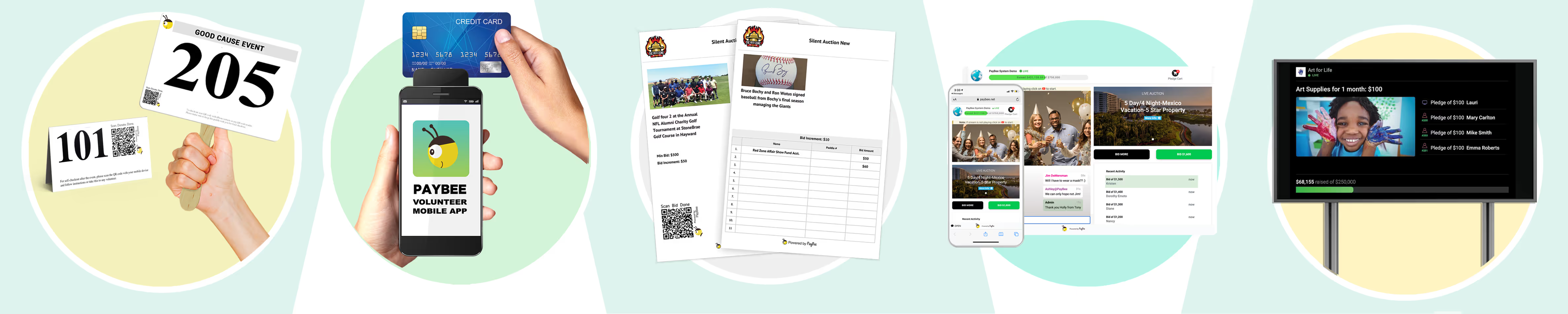
Everything you need comes in one package, from guest management and event ticketing, to secure payment processing, mobile checkout, recurring donation options, auto bid paddles, social media sharing codes, and raffles.
Anyone can sign up and start using the platform for free, although Silent Auctions add a $199 one-time setup fee, while fundraising events have a $399 one-time setup fee. Those events include live streaming, virtual games, event-day tech support, plus pledge drives.
The whole thing might be a bit too much if all you need is a simple donation page, but if you’re looking for more variety, and more control in one place, PayBee could be a good fit.
Pros:
- Consolidated platform for ticketing, mobile bidding, live streaming, P2P and more
- Comprehensive event management tools
- Exceptional customer service, especially for premium events
- Modern tools like QR codes and social sharing buttons built-in
- Ideal for managing online, hybrid, and in-person events
Cons:
- 2% transaction fee sits next to payment processing fees
- Too much for a form-only fundraiser
- Limited customization for some features
Fundraise Up: Best for Donation-Page Conversion
Fundraise Up gives organizations an AI-driven donation platform that’s built specifically to improve conversion rates, and give users a smoother checkout experience.
There are plenty of features to take advantage of, including suggested gift amounts, recurring giving prompts, local currency conversion, digital wallets, and donor self-service. Plus you get tap to donate, gift cards, support for multiple payment methods, and customizable forms. You can also connect your CRM platform, and use AI upselling tools to prompt users to become long-term donors.
Small teams can use it to run peer-to-peer campaigns, or auctions with a dedicated giving catalog. You also get some excellent reports and analytics, with over 300 data points, so you can really figure out what makes people want to offer up more of their income.
The price is a little high, at around 4% of each transaction, and that’s before standard payment processing fees. Still, if you end up with higher conversion rates, they might cover the cost.
Pros:
- Excellent checkout with customizable controls
- AI-enhanced custom donation suggestions and upselling
- Encourages donors to voluntarily cover the platform fees
- Easy integration with CRM platforms
- Supports local currencies and payment methods
Cons:
- Higher platform fee than many alternatives
- No gala options, or bidder paddles
- Limited offline capabilities
Givebutter: Best Broad Free Fundraising Toolkit
If you’re looking for free fundraising tools, or you just want a system that charges you as little as possible, Givebutter is popular. The core software, custom donation pages, and the event features will cost you nothing upfront. You even get email and text messaging included, plus P2P, event ticketing, and a lightweight donor CRM.
With optional tips turned on, there’s no platform fee, and the company even covers processing costs when donors refuse to pay them. However, if you turn tips off, you do pay the 3% processing fee, plus the additional payment processing costs.
For small fundraising groups, Givebutter has a lot to offer, and you can run auctions or peer to peer campaigns side-by-side. There’s also support for donation forms, events, and mobile app integration.
One slight downside, aside from the fees you have to pay if the tipping option is turned off, is that the system is pretty rigid. You don’t have a lot of customization when it comes to creating unique pages, or accessing specific reports. The checkout experience could do with some extra testing too.
Pros:
- Entirely free platform with plenty of great features
- Included donor CRM
- Support for auctions, ticketing, and donation management
- Easy-to-use and modern for fundraising teams
- Excellent customer support reputation
Cons:
- Turning tips off adds extra fees
- Limited reporting and automation features
- Pledge management can be tricky
Zeffy: Best When Every Fee Hurts
Zeffy has a similar appeal to Givebutter for organizations trying to collect donations and run events while keeping outgoing costs as low as possible. As long as you meet their criteria for an eligible nonprofit, you won’t have to pay any platform fees, transaction fees, or card processing fees. All those costs are covered through donor contributions.
Zeffy supports ticketing and auctions, raffles and lotteries, memberships for recurring giving, peer-to-peer campaigns, plus custom donation forms. You can also create an online store where you can sell merchandise. Plus, there’s the option to integrate a CRM, and use automation to send automatic tax receipts and thank you emails to contributors.
Another benefit is the wide range of payment options, which range from online and in-person transactions, to tap-to-pay for mobile events. The biggest issue is around the tipping model confusion. Zeffy prompts people to leave a tip during checkout which is sometimes a pre-selected for a percentage of the gift, so users have to actively state that they don’t want to give anything extra. That can lead to some frustration from your community.
Pros:
- Absolutely no platform, credit card, or transaction fees
- Lots of helpful features for ticketing, membership management, and email
- Fully secure payment processing
- Gift Aid ready with data tracking included
- Helpful analytics and reporting
Cons:
- Somewhat confusing tipping model
- Availability is restricted to certain regions and organizations
- May not be ideal for complex events
GoFundMe Pro: Best for Established P2P Programs
Everyone knows GoFundMe, which is part of what makes it such a good pick for nonprofits sorting through a bunch of different fundraising platforms. It’s one of the go-to options for peer-to-peer fundraising campaigns, and GoFundMe Pro adds extra features on top of what you might expect.
There’s a Studio Designer tool which lets you build branded campaigns and pages without any technical experience. You get Live Events and ticketing in the same place, complete with discount codes, sponsor spotlights, plus real-time leaderboards.
You can also access CRM integrations, personalized supporter portals, corporate matching capabilities for employer programs, and embedded forms for your own website. There’s even an automated “Intelligent Ask” feature that suggests specific amounts to different visitors to boost conversion rates.
The pricing is a bit high though, starting at $299 per month, and then you have the transaction fees to think about too. You’ll also need to adjust your plan depending on the amount of revenue you bring in, and there may be extra fees for custom API access and support.
Pros:
- Support for a wide range of fundraising strategies
- Excellent donor tools, including a self-service portal
- Highly brandable pages and mobile responsive templates
- Well-suited to peer-to-peer campaigns
- Useful intelligent features like Intelligent Ask
Cons:
- Higher costs than most other platforms
- Some complexity with integrations
- Larger campaigns might need custom pricing
Give Lively: Best Free Option for Forms, Text, and P2P
Built exclusively for nonprofits registered in the United States, Give Lively is a free, enterprise-grade fundraising system, with custom campaign pages, embeddable donation widgets, recurring giving options for repeat donators, and event management tools. It works for virtual ticketed events, peer-to-peer fundraising, plus mobile giving.
One of its biggest benefits is how well it works with other software, such as Salesforce, to help sync campaigns, ticket purchases, and donor data for your reports. It’s also completely free to use, with no setup fees or monthly subscriptions. Donors are even routinely prompted to manage the credit card processing fees at checkout too.
Despite being feature-rich, Give Lively is surprisingly intuitive and user-friendly, particularly when it comes to building bespoke donor pages. Plus, Give Lively offers workshops, office hours, and human support. That makes it a serious option for small nonprofits, rather than a stripped-down free form with a premium plan waiting behind it.
It’s worth saying though that you do need to use either Stripe or PayPal for payment processing, and the platform isn’t offered to international or non-registered charity organizations.
Pros:
- Excellent integrations with CRM tools
- Lots of fundraising and giving options
- Zero cost for setup and management
- Donor-covered fees for transactions
- Includes forms, widgets, ticketing, text-to-donate, and P2P
Cons:
- Restricted payment processing options
- Only for registered US nonprofits
- Fewer event management features than some alternatives
Donorbox: Best for Embedded Forms and International Giving
One of the more practical, conversion-optimized donation platforms for nonprofits, Donorbox works well if you already have a website or online presence, and all you want to do is add a simple donation form into the mix. It’s incredibly user-friendly.
Anyone can create and embed a multi-step donation widget into an existing website in seconds, and there are helpful features for add-on donations and monthly giving options too. Speaking of the extra tools, you’ve also got Donorbox Live for in-person kiosks, peer-to-peer fundraising, plus a full AI-powered donor management system or CRM.
Another bonus is the payment variety. You get text-to-give, plus stock donations, and cryptocurrency options, which are all hard to find on many other fundraising platforms.
Donorbox doesn’t charge anything for its standard plan, but platform fees cost 2.95% for donation forms, organization-led P2P, and crowdfunding. Event ticketing, supporter-led P2P, or memberships will cost 3.95% in platform fees before payment processing costs. There’s also a Pro plan starting at $150 monthly that lowers some platform fees.
Pros:
- Easy to add to an existing nonprofit website
- Supports international, recurring, stock, and cryptocurrency donations
- No monthly subscription cost on standard
- Hosted pages, pop-ups and in-person kiosks
- Useful AI-powered CRM system
Cons:
- Platform fees and payment processing fees still apply
- Lacks in-depth live auction or raffle features
- Limited customer support
Building a Recurring Giving Program
A single $20 donation is fantastic, but it still won’t help you reach your goals all on its own. If you can get the same person to donate $20 per month over the next five years, you’ve got something very different. Recurring giving is a powerful way to make every fundraising campaign more profitable.
What you might be surprised to learn, too, is that a lot of people are open to contributing regularly, provided your values match theirs. Neon One found recurring donors stayed for roughly 7.5 to eight years in 2025, compared with 1.5 to two years for other donors. Their average donor lifetime value reached $7,288.26, too.
If you want to make recurring contributions a big part of your strategy:
- Target the right people: You can always make the “monthly subscription” the default option on your website, but that might chase new starters away. It makes more sense to target existing donors who already show how much they support your cause.
- Give the monthly gift a clear job: Use real program costs to explain the offer. Tell donators what $10 or $20 per month actually covers. Create a dedicated page that shows the work you’ve been doing month after month, and explains why regular, predictable income is so helpful. Consider giving your community a name too, like the “Hope Engineers.”
- Pay attention to the early months: M+R found that 10% of recurring givers stopped donating within two months. Pay attention to that. Check whether the donor changed their mind, hit a payment failure, or received too much unwanted communication.
- Stay in touch: Start with an immediate welcome sequence thanking the donor for their support, and explaining what happens next. Then follow up with monthly insights into what you’ve accomplished, and what’s coming next in your plan.
- Think about the launch time: Neon One found that October, November, and December attracted the most new recurring gifts, while January and February were weakest. Build the offer before year-end giving starts rather than bolting it onto the January calendar.
Keep an eye on everything too. Track your monthly recurring revenue, average monthly gift, common payment failures and recovered payments, upgrades, cancellations, and retention over time.
Timing: Giving Tuesday and Year-End Giving Strategy
There are certain days, and specific times of year when your online fundraising strategies can explode, especially if you know how to use them properly.
Giving Tuesday is one great example, it’s the day each week that’s dedicated to giving something back, and people love to show how much they’re getting involved, with social media hashtags and images. The best way to take advantage is to build an ongoing campaign.
At the start of a specific period, make sure everyone knows what you’re raising money for over the next six months, then every Tuesday:
- Share links to your campaign on social media with the #GivingTuesday Hashtag
- Call out and thank your top supporters
- Give everyone an update of how much progress you’ve made towards your goal
- Get people involved in fun competitions with photos and videos
- Run occasional events, like livestreams, raffles, auctions, or quizzes with prizes
Another thing to keep in mind is that your end-of-year giving strategy usually needs to be kept separate. M+R found that the nonprofits they surveyed got about 37% of their revenue from online campaigns in December, and the final week achieved 10% of the full year total. December 31st earned 4% on it’s own, which is a testament to how people feel about their New Years’ resolutions.
End-of-Year Fundraising Tips
The end of the year needs its own strategy. You should still be sharing links to your campaigns regularly, and thanking your top performers, plus people keeping informed with the progress you’re making. But start early with a more specific end-of-year campaign.
- Consider running winter-themed hybrid events, like hybrid auctions with festive-themed prizes, or a Turkey run.
- Use countdown timers to drive urgency, and remind people of the goal you’re trying to achieve at the end of the year.
- Try connecting with match fundraising partners or other collaborators who can add more to your fundraising efforts.
- Make sure quick payment options are available, like Apple or Google Pay for people who want to jump in quick when they’re feeling generous.
- Develop a compelling story to share when you start the new year, looking back over everything you’ve done, and forward to what’s ahead.
Write the January message before December 31. Thank people, publish the result, and explain what the money now allows the organization to do. Waiting six weeks turns a successful campaign into a bank transaction with good branding.
Measuring Online Fundraising Results
Most of the best platforms for running virtual fundraising events already come with tools that help you to get the data you need to improve future campaigns. Take advantage of the reporting and analytics tools available to you, but remember that some numbers will matter more than others.
Impressions on social media are great, for instance, but you can’t add them to your bank account. The most important metrics to keep an eye on:
It helps to keep different campaign types and channels separate too. You can’t judge a gala with sponsorship income the same way you’d judge a Facebook appeal. Auction proceeds also need things like donated-item value insights, card fees, venue costs, and unpaid winning bids deducted before you can create your financial report.
You also need a strategy for tracking retention. If two strategies bring in similar income in one month, but one mostly relied on one-off donations, and the other got people to sign up for recurring donations, you know which one is more valuable.
Also, be careful with attribution. Use consistent UTM tags for email, paid ads, partner links, and supporter posts. Give each printed QR code its own source label. I’d keep both the donor’s original acquisition source and the source of the latest gift; replacing one with the other erases useful history.
Common Online Fundraising Mistakes
Before you rush off to start raising money online, it’s worth making sure you’re aware of the ways that virtual campaigns can go wrong. It’s easy to make mistakes, even if you have a very useful platform to help you manage everything.
Avoid:
- Making the form too complicated: Don’t ask donors for information you don’t really need. That’s a sure-fire way to encourage them to put their contribution on the back-burner because they don’t have time to type an essay.
- Testing on a laptop only: An event, raffle, or campaign page that works well on a desktop or laptop is great, but that doesn’t mean it’ll work just as well on a mobile device. Experiment with a smartphone first, use mobile data, rotate the screen, and try out Apple Pay or Google Pay to check for any mistakes.
- Changing the story: Someone responds to an appeal about replacing a shelter boiler, then lands on a general donation page filled with broad mission language. Carry the same need, photograph, and suggested amounts through to checkout. Donors shouldn’t have to confirm they clicked the right link.
- Hiding recurring giving or demanding it too much: A tiny monthly checkbox gets missed. A preselected recurring gift can annoy people who intended to donate once. Show both choices clearly and explain what regular income pays for.
- Treating the receipt as donor care only: Sending someone a receipt is helpful, but it doesn’t give them a reason to stay or come back later. Follow up with messages about the campaign they supported and what happened next.
- Letting P2P participants handle everything alone: Anyone can register for a peer-to-peer campaign, but your supporters need more help than that. Give them a first-gift plan, editable content they can customize, photographs, and a person they can contact when their page stops working the way it should.
Another quick tip, take your campaign for a test run before you launch it publicly, even if that means making the donation yourself. You can always refund it afterwards. That’s cheaper than missing problems that your donors will find later.
Use PayBee to Simplify Your Online Fundraiser
Online fundraising is an incredible way to generate income and ongoing support for just about any cause. These days, people expect to be able to interact with the programs they care about online, and running an online event gives you a fantastic opportunity to stretch your reach further than you ever could with a local in-person event.
All you really need to make the whole experience successful is a combination of three things, a good community, the right software, plus a strategy that fits your goals.
The community and strategy takes time and patience to build, but choosing the software can be easier than you’d think. A straightforward web appeal might be brilliant to run with Fundraise Up, Zeffy, Give Lively, or Donorbox. PayBee makes a much stronger case if you want versatility.
If you’re going to be hosting events that include ticket sales, guest seating, live or silent auctions, mobile bids, and a final checkout, PayBee helps to keep everything connected.
Test it for yourself. Book a PayBee demo and take a real event plan along for the ride. Ask the team to show exactly how it would handle late guest swaps, remote bidders, split payments, unpaid pledges, and the report finance needs afterward.
FAQs
What is online fundraising?
Online fundraising is the term applied to all the digital strategies organizations use to collect money for a cause. It can include everything from custom donation pages, to email, SMS, or text appeals, ticket sales, peer-to-peer fundraising, online or hybrid auction events and more. You can manage it all with an online fundraising platform.
What is the best free online fundraising platform?
A lot of fundraising platforms offer free entry-level tiers, including PayBee, although it’s worth keeping processing fees in mind. Zeffy is usually the most obvious option because it covers all of the possible extra costs through optional donor tips, so you get to keep the full donation amount. Give Lively and GiveButter have similar free options.
How much does online fundraising software cost?
There’s quite a bit of range. Zeffy is genuinely free to use, and PayBee has a free online membership with a 2% transaction fee. Fundraise Up charges 4% plus payment processing fees, and there’s the more premium options like GoFundMe Pro which do come with a monthly subscription charge starting at $299 per month.
What is a good online donation page conversion rate?
It depends, according to M+R benchmark reports, in 2025, the average desktop donation page got an 11% conversion rate, and mobile pages got 8% on average. Still, the size of your nonprofit and the amount of effort you put into promoting your campaigns can make a big difference.
Can a nonprofit raise money online without a website?
Absolutely, you can run a hosted campaign that gives you a link you can share in emails, social media posts, or printed materials and QR codes. You don’t necessarily need a website, but it does help to have an online presence if you want something that keeps donators connected with your team, and your mission. It’s also a good way to ensure you can collect email addresses for future campaigns.
What’s the difference between crowdfunding and peer-to-peer fundraising?
Crowdfunding is a type of money collecting strategy for nonprofits that gathers donations on a central page. P2P gives teams of supports their own goals, pages, sharing links, plus similar resources under a nonprofit’s central campaign. Crowdfunding tends to need a persuasive central appeal, while P2P needs to help each fundraiser start connecting with people they know.
Start Fundraising
 Rebekah Carter
An experienced copywriter and content producer with years of background in the technology, social media, and business development fields. Over the course of their career, they have developed social media posts, content strategies, blog content, eBooks, podcast scripts, and more. Their skills are deeply entwined with the power of the written word and what it can do to transform the perception and potential of a brand.